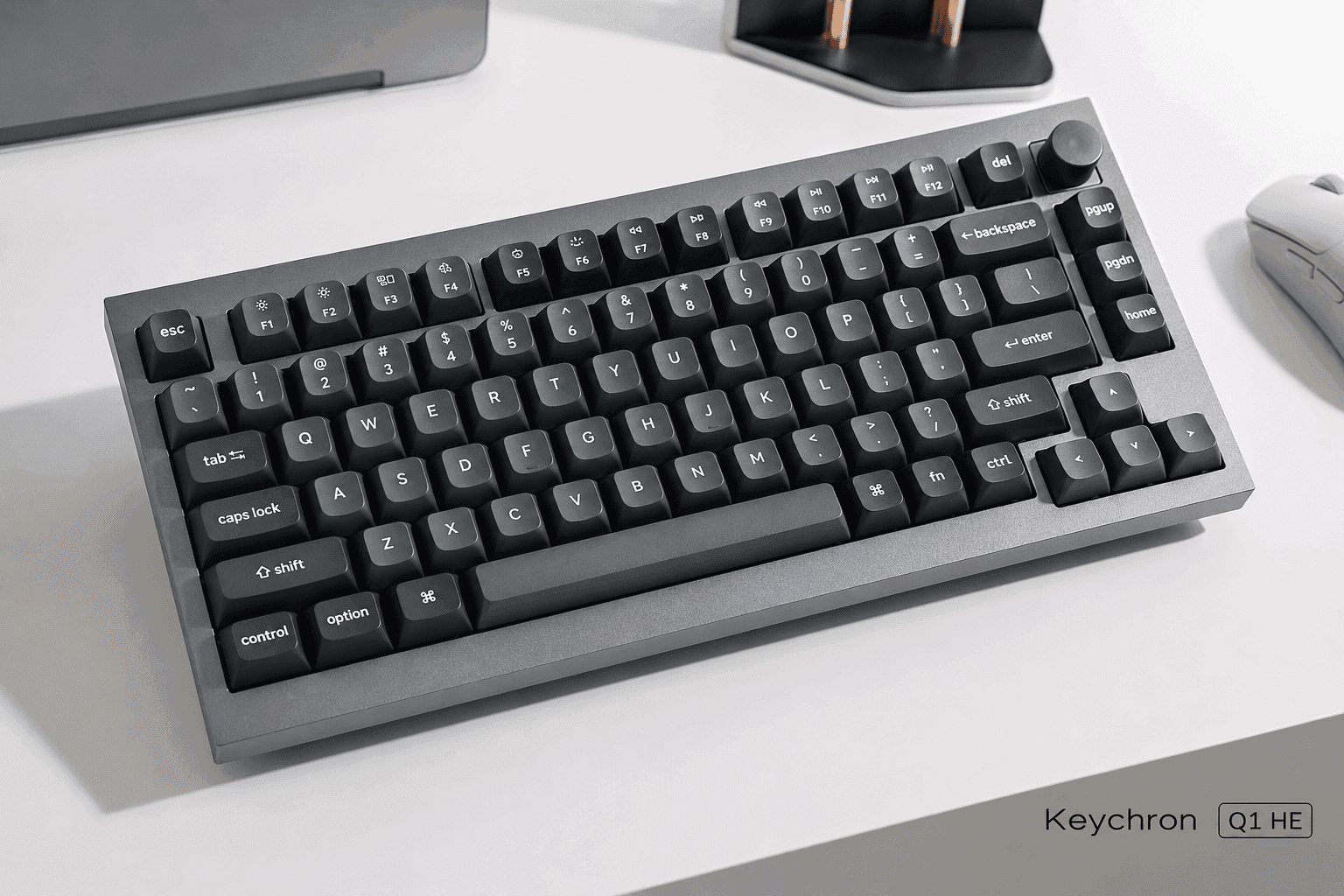
Picking a mechanical keyboard usually means picking a side. Do you want the tactile, deliberate feel of traditional switches, or the fast actuation of the newer magnetic kind? The Keychron Q1 HE refuses to pick. It drops advanced Hall Effect switches into a heavy aluminum chassis and chases both crowds at once. This is a spec-based analysis using published manufacturer specifications and market comparisons. No hands-on testing was conducted. As a first-generation magnetic board from a brand better known for enthusiast-grade DIY kits, it aims squarely at competitive gamers and heavy typists alike. Magnetic keyboards used to chase raw speed above all else, wrapping their guts in light plastic shells that sounded hollow and cheap. This one goes the other way — gasket-mounted aluminum, tuned for weight and sound. That matters to the custom-keyboard crowd, the folks who want rapid-trigger performance without giving up the deep, solid sound signature a heavy case is built to deliver. Whether those structural and electronic choices actually balance out is the question this Keychron Q1 HE review digs into, especially once you line it up against the gaming-first boards that got here first.
The Quick Take
Keychron took its heavy aluminum Q-series body and dropped in Gateron Double-Rail Magnetic Switches. The result is a board trying to please two very different people at once: the typist who cares about sound and feel, and the gamer who cares about actuation speed. On paper, it mostly pulls it off.
Keychron Q1 HE
Gaming, typing, and custom-keyboard enthusiasts who want rapid-trigger performance
Premium price tier
Check PriceKeychron Q1 HE Review: Product Overview
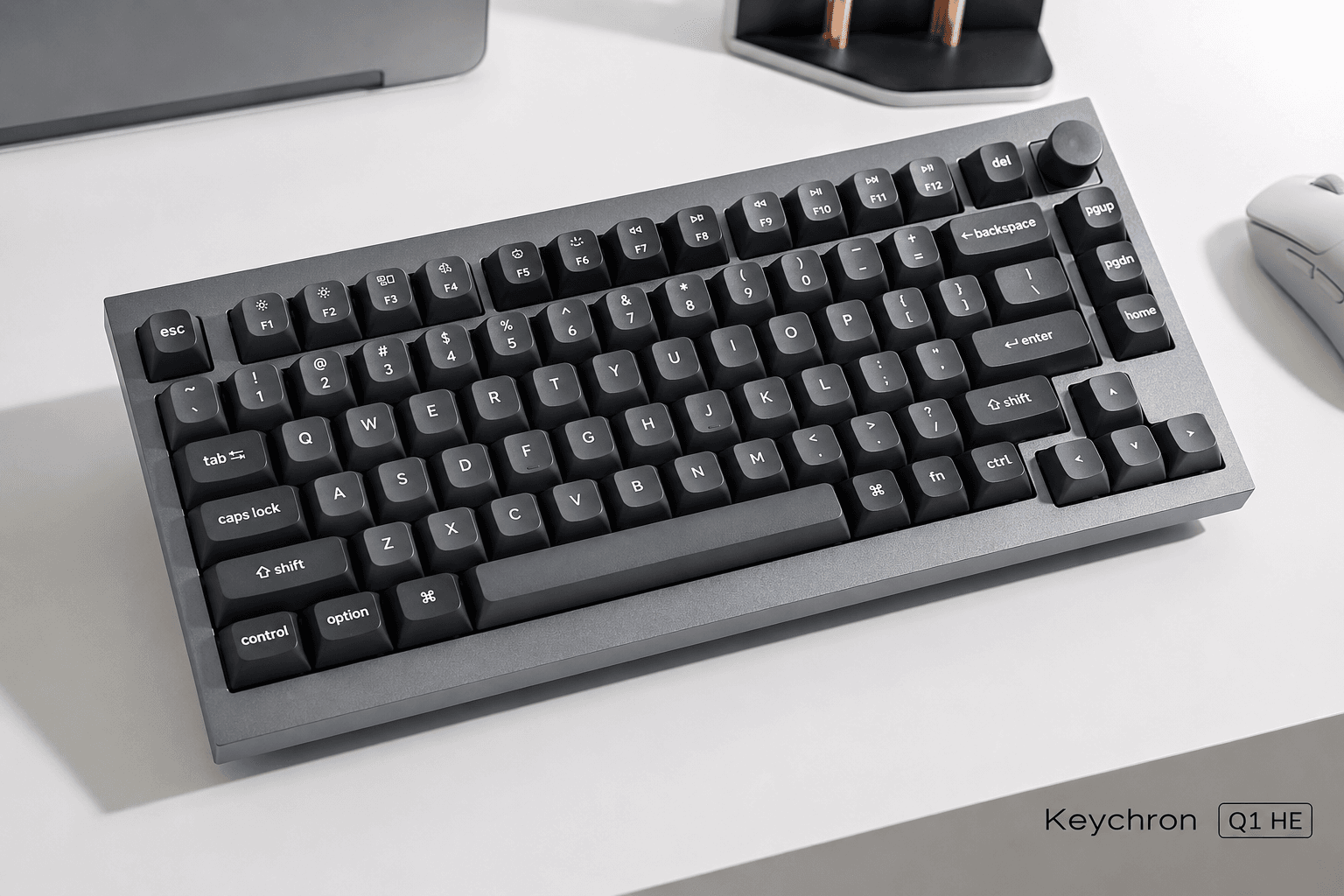
Start with the shell. It's a CNC-machined aluminum body, the calling card of Keychron's Q-series, sitting on a double-gasket mount. Where most gaming boards lean on plastic frames or a thin metal top plate, this one is metal through and through. That gasket structure exists to soak up harsh vibration and push the sound deeper than a stiff tray-mounted case would.
Then there's the real headline: the Gateron Double-Rail Magnetic Switches. Instead of physical contact points, they use Hall Effect sensors to read exactly how far a key has traveled. That opens up adjustable actuation, anywhere from a hair-trigger 0.2 mm to a deep 3.8 mm. Set keys shallow for twitchy gaming inputs, or deep to keep stray typos out of a long writing session. And because the double-rail design cuts stem wobble, each key tracks a clean vertical path.
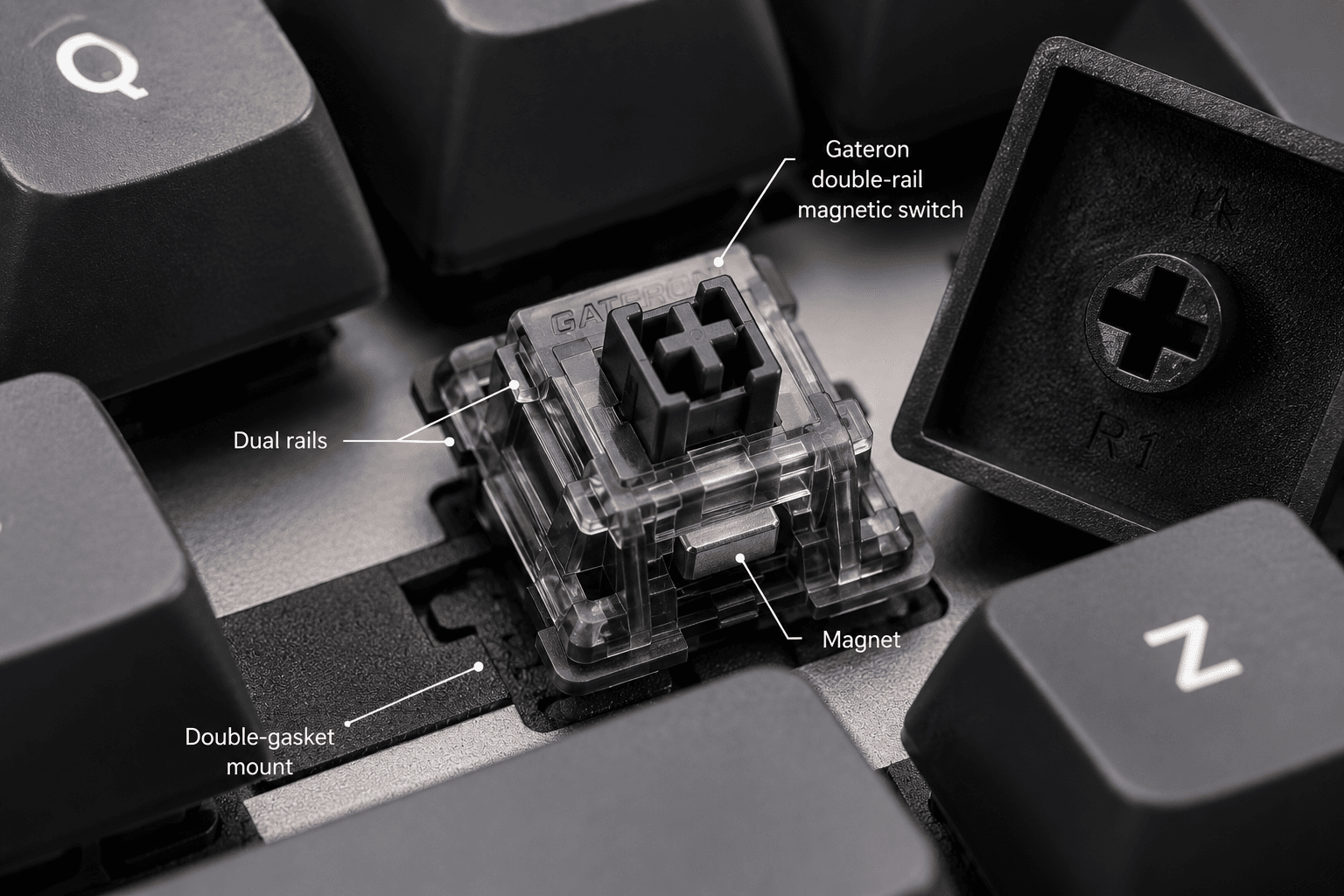
That magnetic architecture also unlocks rapid trigger. A normal switch has to climb back past a fixed reset point before it will fire again. Hall Effect sensors skip that rule — the key resets the instant it starts moving up, so you can hammer repeated inputs almost without pause. In competitive titles where repeat speed decides fights, that's a real edge.
A 75% layout hits the sensible middle ground. You keep the function row and arrow keys, but the number pad gets cut to free up desk room for the mouse. Connectivity runs three ways: 2.4 GHz wireless, Bluetooth 5.2, and wired. Worth flagging, that — plenty of competitive magnetic boards stay tethered, since continuous Hall Effect sensing is power-hungry. The hot-swappable PCB lets you pull and replace magnetic switches, though only supported magnetic designs fit, not standard 3-pin or 5-pin mechanical switches.
Key Specs and Compatibility
On compatibility, this board mixes open flexibility with a few hard limits. It works across macOS, Windows, and Linux, and a physical toggle flips the layout between them on the spot. Configuration lives in the browser-based Keychron Launcher, where you remap keys, tune actuation distances, and set rapid-trigger thresholds — no bulky background app on your machine.
Hardware swaps come with an asterisk. The double-rail switches are hot-swappable, but only Gateron magnetic replacements will seat properly. Drop in a standard MX mechanical switch and it simply won't work, which stings if you've got a drawer full of them. Keycaps are friendlier: the stems use the usual MX cross, so the stock OSA-profile PBT set comes off easily for whatever aftermarket caps you like.
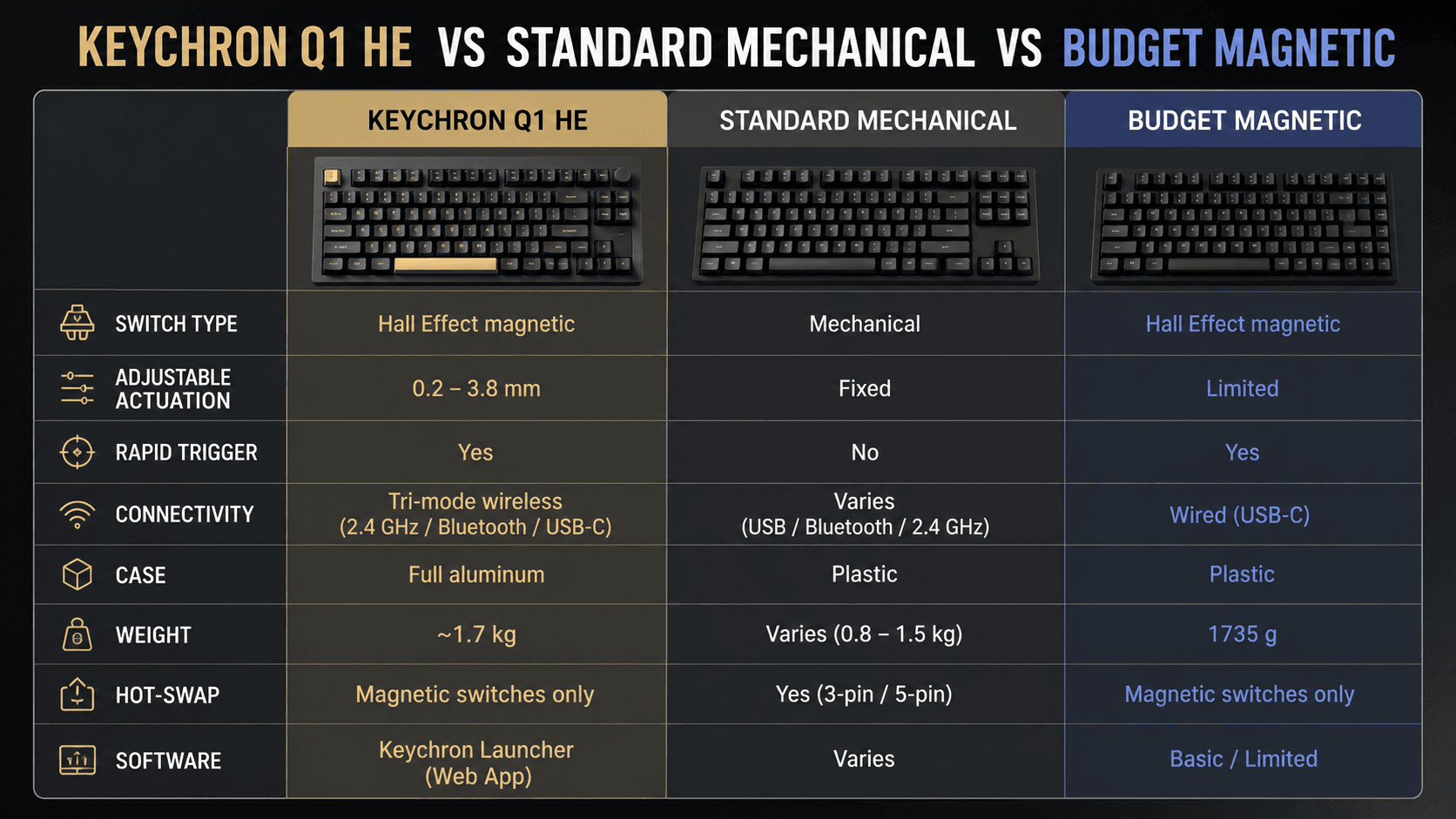
Against rivals like the Wooting 60HE, the SteelSeries Apex Pro, or the DrunkDeer A75, this one leans on its weight and its wireless. The Wooting 60HE has a deep software reputation and analog movement tricks, but it's a plastic case on a wired-only tether. Keychron's pitch is the opposite — a heavier, more solid board for people who want a tidy wireless desk and gaming specs in the same package.
| Spec | Keychron Q1 HE | Wooting 60HE | SteelSeries Apex Pro | DrunkDeer A75 |
|---|---|---|---|---|
| Switch tech | Hall Effect magnetic | Hall Effect analog | OmniPoint magnetic | Hall Effect magnetic |
| Case | Full CNC aluminum | Plastic | Plastic frame | Plastic |
| Mount | Double-gasket | Tray-mount | Non-gasket | Non-gasket |
| Layout | 75% | 60% | Varies by model | 75% |
| Connectivity | Tri-mode (2.4 GHz / BT 5.2 / wired) | Wired only | Wired | Wired |
| Rapid trigger | Yes | Yes | Yes | Yes |
| Hot-swap | Yes (magnetic only) | — | No | Yes (maker advises against) |
| Price position | Premium | — | Mainstream | Budget |
What Stands Out
Those Gateron Double-Rail Magnetic Switches are the reason this board exists, and they mark a real turn for the Q-series. Rather than metal contacts, Hall Effect sensors read the stem's travel distance directly. No physical contact means no contact wear, which should stretch switch lifespan, and the motion is a straight linear glide by design. The double-rail part matters more than it sounds: it pins down stem wobble, the old weak spot of early magnetic switches, so a key registers the same whether you hit it centered or catch it on an edge.
Customization runs deep, too. Inside the Keychron Launcher web app, every single key can have its actuation point dialed from 0.2 mm up to 3.8 mm. Want a feather-light trigger for gaming and a more deliberate press for typing? You can split it key by key. Layer rapid trigger on top — resetting the key the moment it lifts instead of waiting for a fixed reset point — and the competitive use case gets obvious.
Wireless is the third piece. Most high-performance magnetic boards chain you to a cable to hold latency down; this one hands you 2.4 GHz wireless at a 1000 Hz polling rate, Bluetooth 5.2 for juggling devices, and a wired option when you want it. Going from a locked-in gaming rig to a clutter-free multi-device desk takes no rewiring.
Strengths
On the productivity side, the case does the heavy lifting. By spec, the double-rail magnetic switches are linear, with less friction than the contact mechanism traditional mechanical switches rely on. And the acoustic story is built into the hardware — a dense CNC-machined aluminum body plus internal sound-dampening foam, which Keychron tunes to swallow high-frequency ping and lean the sound deeper and more solid.
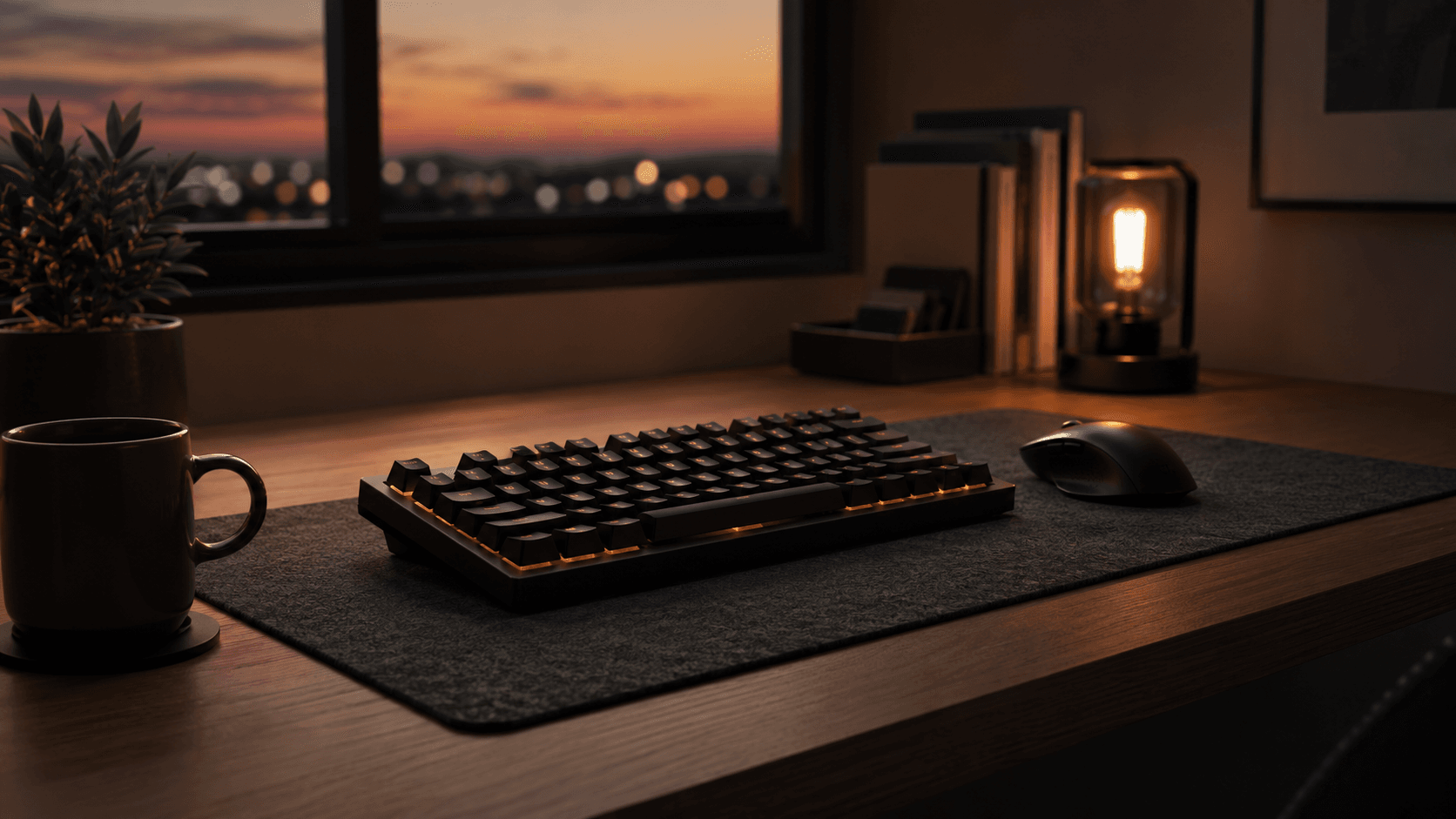
That 75% layout earns its keep for daily work, holding onto the arrow keys and a navigation column while handing back desk space for the mouse. A programmable rotary knob sits up top for volume, zoom, or scrubbing a timeline. And with Bluetooth 5.2, you can keep up to three devices paired — a work laptop, a tablet, a phone — and jump between them with a keystroke.
For play, the rapid trigger and adjustable actuation fold neatly into a normal day. Build a profile that fires up automatically when a specific game launches, get hair-trigger response for the match, then drop back to a calmer typing profile afterward. The 2.4 GHz link is meant to feel no different from a cable, so your inputs land instantly without a wire snaking across the desk.
Weaknesses
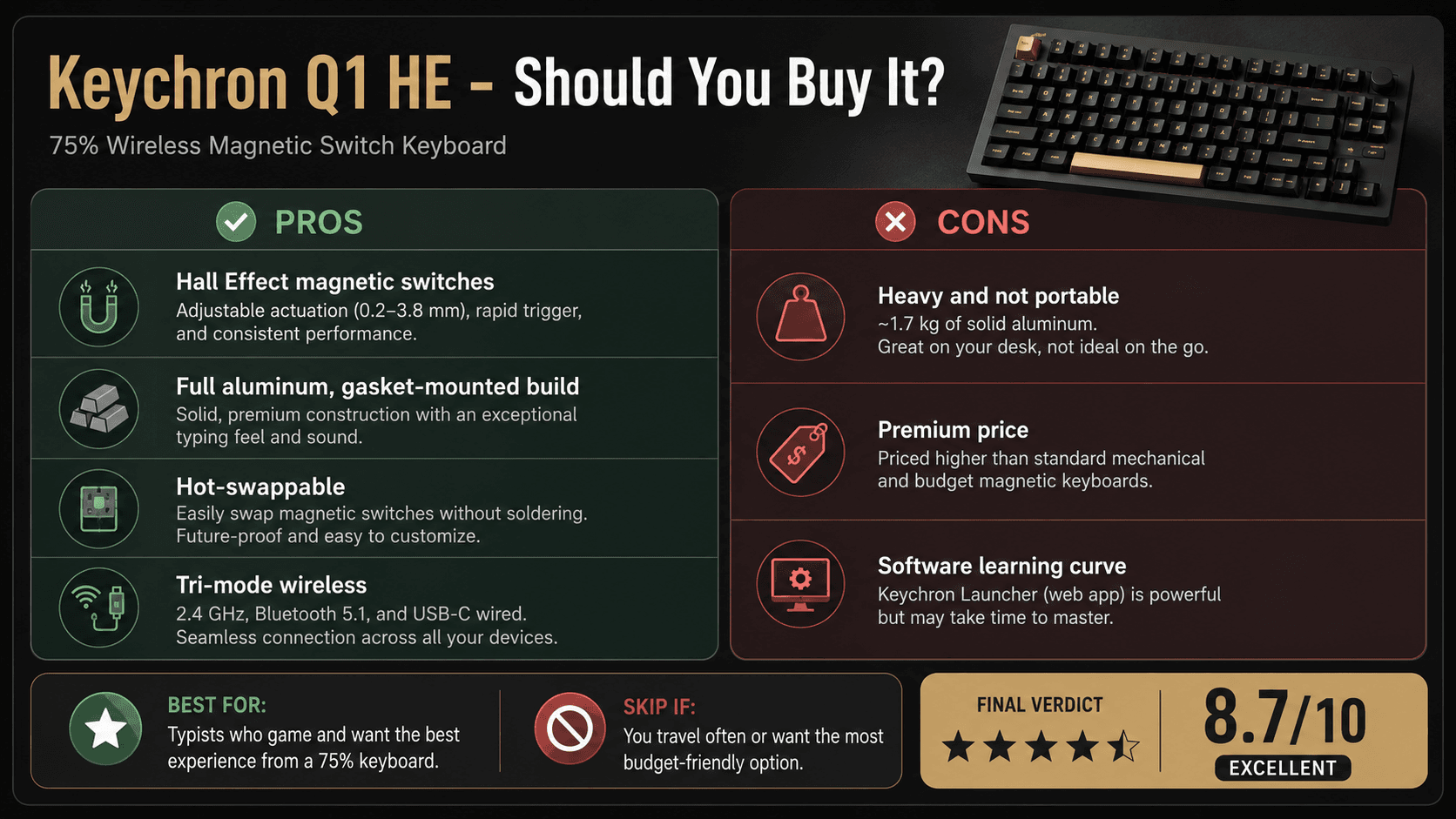
For all it gets right, the Q1 HE asks for some compromises. Weight is the first one you'll feel. Keychron lists the fully assembled board at 1735 g — roughly 1.7 kg, or about 3.8 lb — and that solid aluminum chassis is the reason. This is not a travel keyboard. If you're the type to move a board between rooms or haul it to a LAN, it'll feel like a brick next to a plastic alternative.
There's also a quieter tension baked into the design, and it's the one worth thinking hardest about. Gasket mounts exist to flex under your fingers and cushion each press. Magnetic switches, though, work by measuring the exact distance between the magnet in the stem and the sensor on the PCB. Those two goals pull against each other. The more the plate is allowed to move, the more room there is for that magnet-to-sensor gap to shift mid-press, and actuation is only as consistent as that gap is stable. Keychron's published answer is a retuned internal structure that limits flex where the sensors sit while leaving some give elsewhere. How well that compromise actually holds is exactly the sort of thing a spec sheet can't settle — it needs measurement under real typing loads. On paper, expect a board that reads a touch firmer than a standard mechanical Q-series, which is the toll for keeping the sensors honest.
Software asks for patience. The Keychron Launcher gets the job done without dumping a background app on your system, but wrangling the deeper tricks — dynamic keystrokes, multiple actions per key, custom rapid-trigger zones — takes trial and error. Battery is the last catch, and it swings hard with your settings. Full RGB over 2.4 GHz wireless burns through a charge far quicker than Bluetooth with the lights off, so plan on charging more often than a plain wireless office board.
Best Alternatives
Shopping around, a few boards earn a real look, mostly depending on the layout and software you care about. The closest rival is the Wooting 60HE — the board that put Hall Effect analog on the map. Its software is more mature, with deeper rapid-trigger tuning. But you trade down to a 75% aluminum gasket-mount case, so it's the sharper pure-gaming tool while the Q1 HE's aluminum 75% frame is the better all-day typer. The SteelSeries Apex Pro is the mainstream pick, with wider retail shelves and a familiar software suite. Its plastic-framed, gaming-first build skips the gasket mount and hot-swap flexibility you get here, though. And the DrunkDeer A75 is the budget door into magnetic switches: same 75% layout, same rapid trigger, lower price. You give up the full-aluminum build, the acoustic dampening, and the tri-mode wireless to get there. It comes down to one question — raw gaming-software depth, saving money, or the heavier build and sound Keychron brings to the magnetic space.
Who Should Buy It
The Q1 HE makes the most sense for custom-keyboard people who won't drop their build-quality standard but still want Hall Effect speed. Split your time evenly between ranked matches and long typing stretches? This is built for exactly that rhythm. Its 75% layout keeps the function and arrow keys within reach, which suits office work, coding, and everyday tasks. Gamers on twitchy genres — shooters, rhythm titles, anything that rewards fast repeats — get the adjustable actuation and rapid trigger of the Gateron Double-Rail switches. And with tri-mode connectivity, it fits anyone running a few devices who wants a clean wireless desk without surrendering 2.4 GHz latency. If a heavy, gasket-mounted aluminum board built for a deep sound is your thing, few magnetic keyboards scratch that itch the way this one does.
Who Should Skip It
It's not for everyone, though. Pure competitive players who want the most battle-tested analog software may feel more at home on Wooting, since Keychron's web launcher is still maturing next to the established gaming suites. Anyone who wants a light board to toss in a backpack for travel or a LAN will find this slab of aluminum too heavy to bother with. Budget shoppers should walk on by — if you just want to sample rapid trigger without paying for luxury materials, a plastic-shelled option like the DrunkDeer A75 gets you similar gaming feel for far less. And if competitive features like adjustable actuation and rapid trigger mean nothing to you, Keychron's own standard Q-series delivers the same typing comfort and build for less money, minus the magnetic hardware you'd never switch on.
Verdict
This Keychron Q1 HE review lands on a clear verdict: it's the board to beat if you refuse to trade build quality for rapid-trigger speed. Keychron slid Gateron Double-Rail Magnetic Switches into its heavy aluminum Q-series body, and the payoff is a keyboard that reads equally well to typing purists and competitive players. The 75% layout stays one of the more practical shapes going, keeping the arrow keys and a navigation cluster without eating your desk. Where mainstream gaming brands settle for plastic housings and hollow acoustics, this first-generation Hall Effect board holds onto the gasket-mounted, deep sound enthusiasts chase. Tri-mode connectivity — 2.4 GHz wireless, Bluetooth 5.2, and wired — keeps it flexible across devices and operating systems. And it goes right at the Wooting 60HE and SteelSeries Apex Pro with a more solid frame and a more refined feel on paper. If you want one board that flips from fast matches to long writing without missing a step, the case here is strong. Just know what you're signing up for. This is a heavy, hot-swappable desk centerpiece that fixes the cheap-feel problem of mainstream gaming gear, and it carries real magnetic-switch performance for modern play.
Sources & References
Specifications, pricing context, and claims in this analysis were cross-referenced against the sources below.
- Keychron Q1 HE QMK Wireless Custom Keyboardkeychron.com
- Keychron Q1 HE 8K Magnetic Switch Keyboardkeychron.com
- Keychron Q1 HE Review: The wireless HE keyboard you' ...tomshardware.com
- Keychron Q1 HE 75% Wireless Mechanical Gaming Keyboard ...multitronic.fi
- Keychron Q1 QMK Custom Mechanical Keyboard - Version 2keychron.com
- Keychron Q1 HE | Unboxingyoutube.com
- Keychron Q1 HE Reviewpcmag.com
- Keychron Q1 HE [Q5 HE, Q6 HE, etc.] Keyboard Reviewrtings.com
Frequently Asked Questions
It is best for buyers whose setup matches the product’s strongest features and who want a clear view of its trade-offs before choosing an alternative.