Logitech G PRO X Superlight 2 Review: Buy for FPS, Skip for Work?
A 60g symmetrical FPS mouse with USB-C and up to 8,000Hz wireless polling. Great for a gaming-only desk, but skip it if you need Bluetooth or lots of thumb buttons.
Buy this mouse for the mouse itself, not for the biggest number on the box. This Logitech G PRO X Superlight 2 review comes down to three things: a 60g body, a familiar symmetrical shape, and LIGHTSPEED wireless that you can push up to 8,000Hz polling. It's built for a dedicated FPS setup where aiming matters more than extra buttons or work shortcuts.
If you own the original Superlight, the useful upgrades are USB-C charging and LIGHTFORCE hybrid optical-mechanical switches. The HERO 2 sensor adds a wider sensitivity range and more tracking headroom, while the outside keeps the same shape. You get newer hardware without having to get used to a different shell.
Skip it if you need Bluetooth for a second computer, or a mouse covered in shortcut buttons. With five programmable buttons and a standard scroll wheel, this is a focused gaming mouse. For a desk you use for both work and play, that simplicity may be exactly why you buy something else.
Some links in this article are affiliate links, which helps support GadgetPickr at no extra cost to you.
The Quick Take
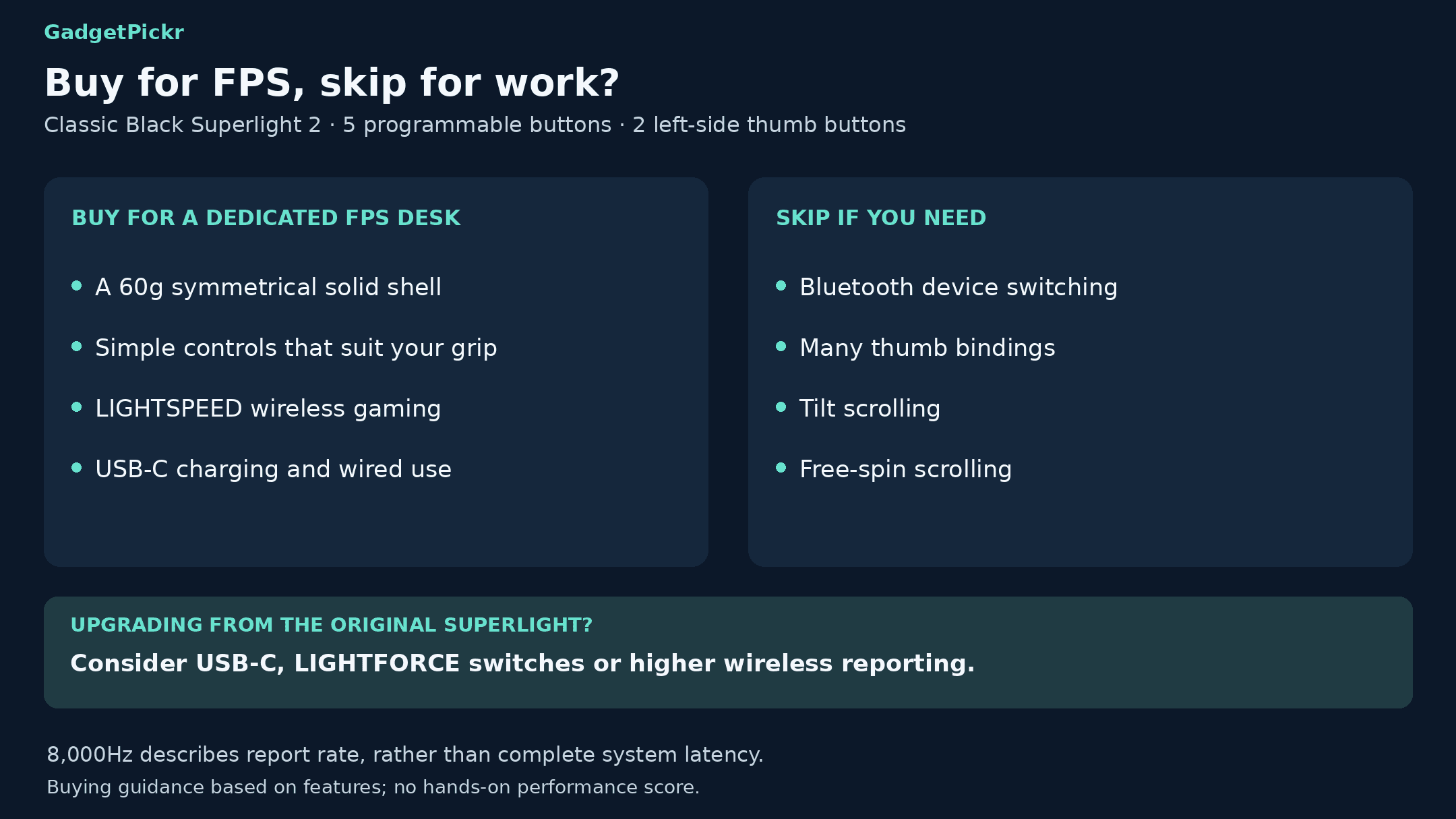
Get the Superlight 2 for a gaming-only FPS setup if you want its 60g symmetrical shape, USB-C charging, and fast wireless polling. Skip it if you need Bluetooth switching, lots of macros, or a free-spinning scroll wheel. Let the shape and buttons decide, not the 44,000-DPI ceiling.
Verdict
This Logitech G PRO X Superlight 2 review lands on a clear recommendation: buy it for a dedicated FPS setup if its 60g symmetrical shape and simple controls are what you want. Its biggest strength is that focused package, backed by USB-C, LIGHTFORCE switches, and adjustable wireless polling. The big sensor numbers support the design, but the shape should still be what makes your decision.
Skip it if you have a mixed work desk with several devices, or play games that need lots of thumb buttons. No Bluetooth is the dealbreaker for the first group, and having only two side buttons is the dealbreaker for the second. Cranking polling up to 8,000Hz fixes neither problem.
If you already own the original Superlight, upgrade for USB-C, the new switches, or a higher polling rate you'll actually use. If none of that matters to you, keeping the mouse you already like makes sense. Buy the Superlight 2 because it fits your needs, not because 44,000 DPI sounds like something you should have.
G PRO X Superlight 2 Wireless Gaming Mouse
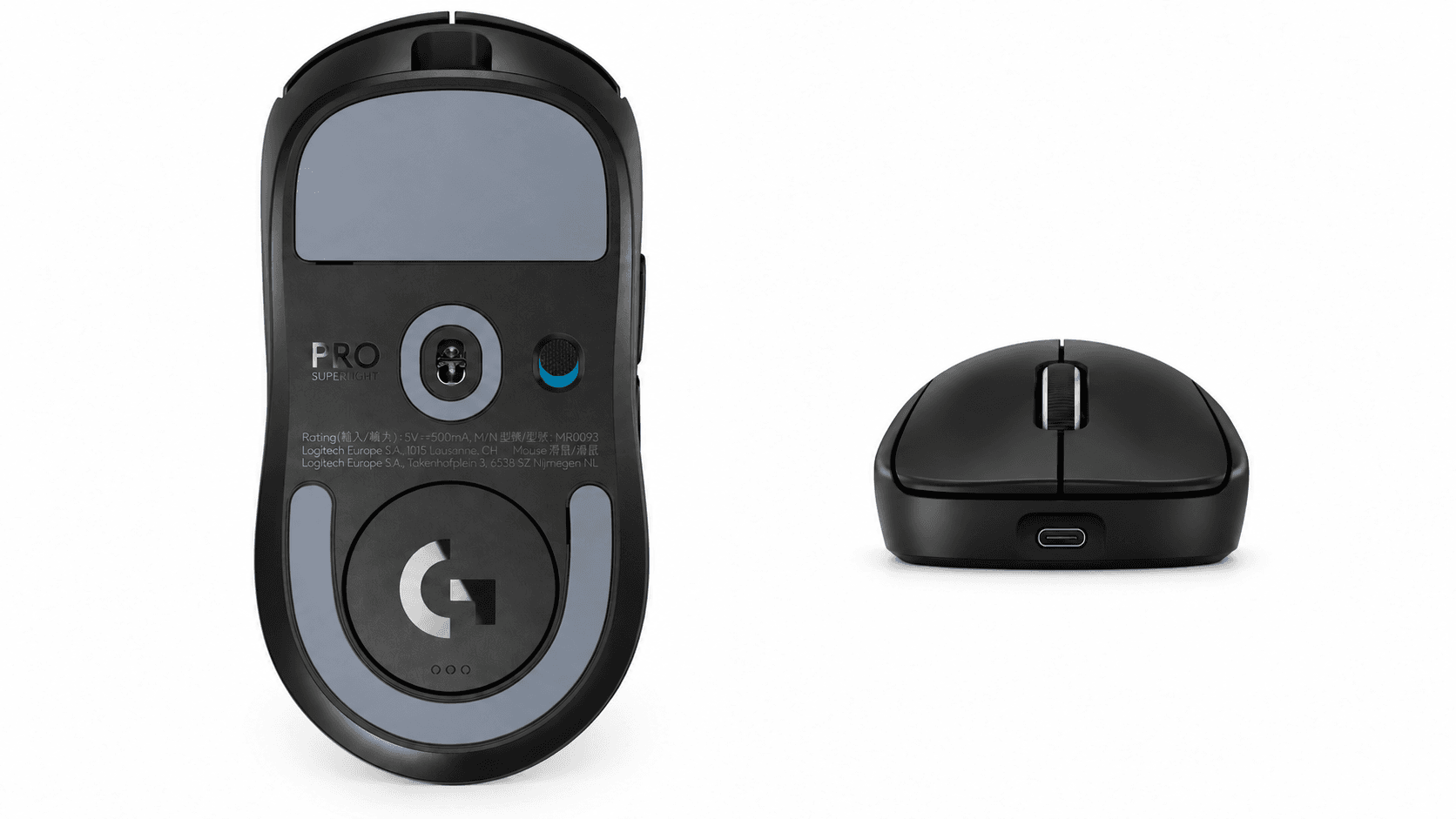
This link is for the Black Superlight 2 with the classic symmetrical shape. It's a different mouse from the right-handed DEX and the smaller compact versions.
A premium FPS mouse. You're paying for the low weight, the shape, and the wireless features.
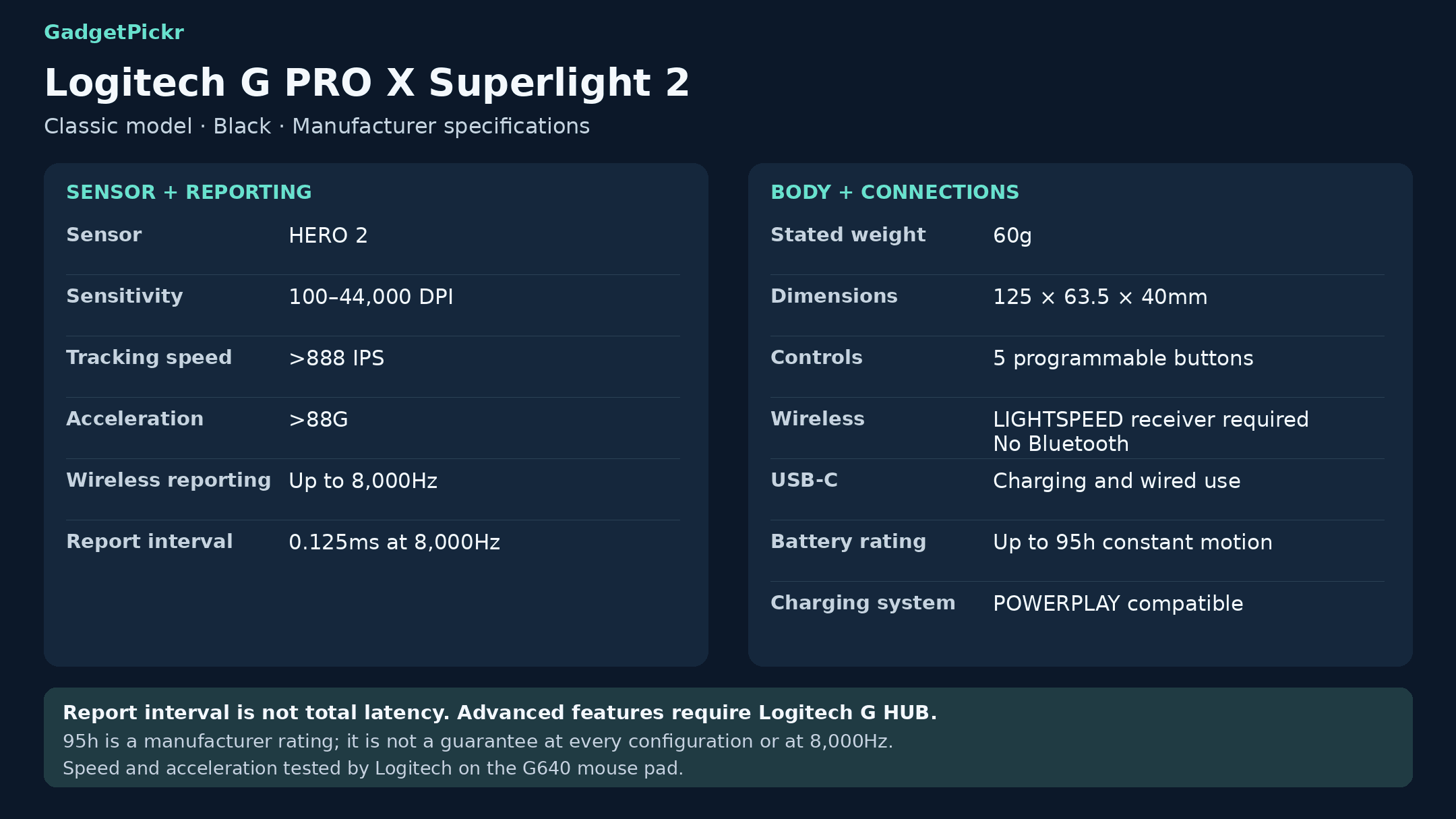
Tracking is handled by Logitech's HERO 2 optical sensor. Logitech's current specs list a 100–44,000 DPI range, a max speed above 888 IPS, and max acceleration above 88G. Those are the sensor's limits, not settings you need to copy into your favorite shooter.
What you'll actually use is whatever sensitivity suits how you move your arm and your in-game settings. A higher max DPI doesn't mean you need to give up the lower setting you already like.
LIGHTSPEED connects through a 2.4GHz receiver, with wireless polling up to 8,000Hz. At 1,000Hz, the mouse reports every 1ms. At 8,000Hz, it reports every 0.125ms. That's just how often it sends updates, not the total delay between moving your hand and seeing it on your monitor.
It measures 125 x 63.5 x 40mm, weighs a listed 60g, and has a solid shell with no honeycomb holes. Both thumb buttons are on the left side, so even though the shape is symmetrical, lefties don't get side buttons on their side.
It charges through a USB-C port on the front, which also works for wired play. Along with the two side buttons, you get the two main clicks and a scroll-wheel click, for five programmable buttons total. Logitech's G HUB software handles button mapping, sensitivity, and polling rate.
Logitech rates the battery at up to 95 hours of constant motion. It's also POWERPLAY compatible, so you can charge it with a compatible mouse pad and charging module. That's worth factoring in if you'd rather have charging built into your mouse pad than plug in a cable now and then.
Key Specs and Compatibility
These are the Superlight 2's current specs, including the higher polling rate and sensor limits listed in Logitech's latest documentation. Older launch materials list lower numbers, so make sure your G HUB software and firmware are up to date before setting it up.
Spec
Logitech G PRO X Superlight 2
Weight
60g (manufacturer spec)
Sensor
HERO 2 optical
Sensitivity
100–44,000 DPI
Max tracking speed
>888 IPS
Max acceleration
>88G
Max wireless polling
Up to 8,000Hz (0.125ms between reports)
Battery life
Up to 95 hours of constant motion (manufacturer rating)
Connectivity
2.4GHz LIGHTSPEED wireless; USB-C wired; no Bluetooth
Programmable buttons
5
Dimensions
125 x 63.5 x 40mm
Feet
Zero-additive PTFE
Logitech's support specs list Windows 10 and Windows 11, with G HUB for setup. Onboard memory saves your settings, while advanced features need the software. POWERPLAY compatibility only adds wireless charging. It doesn't add Bluetooth or a way to switch between computers.
What Stands Out in This Logitech G PRO X Superlight 2 Review
Keeping things familiar is the smartest part of the design. Logitech kept the original shell dimensions and updated the sensor, main switches, and charging port. If you already own a Superlight, that's a much easier upgrade than switching to a mouse with a different shape and thumb-button layout.
The main buttons use LIGHTFORCE switches, which combine optical and mechanical technology. That's a real change from the original model's purely mechanical switches.
Set up the high polling rate with some thought. Going from 1,000Hz to 8,000Hz means the mouse sends position updates more often, but your PC and the game still decide what actually shows up on screen. Pick a setting your system handles well, and don't feel like you have to max it out.
G HUB's sensor settings are more useful than just cranking DPI higher. You can set different sensitivity for the X and Y axes, adjust lift-off distance, and calibrate the sensor to match another mouse's feel. That's handy if you lift your mouse a lot to reposition it, or want to recreate a setup you're used to.
USB-C is the least exciting upgrade, but one of the easiest to appreciate. It uses the same connector as a lot of your other gear, and you can keep playing while it charges. It replaces the original Superlight's micro-USB port without changing anything else about the mouse.
Strengths
On a dedicated gaming PC, everything about it fits together. The 60g body, five-button layout, and wireless receiver keep the focus on moving your cursor, not on a pile of extra buttons. You're buying a specific shape and button layout, not a work mouse with some gaming features tacked on.
The solid shell is another clear choice. It gets its low weight without holes in the top, and the bottom has zero-additive PTFE feet. Those feet help it glide on your mouse pad, though nothing makes movement truly frictionless.
Battery life is solid too. Logitech rates it at up to 95 hours of constant motion, and you can always plug in the USB-C cable and keep playing if it runs low.
That wired USB-C connection gives you a backup when you need to charge. POWERPLAY gives you another option, charging the mouse while you use it without any cable at all. Just decide whether that accessory makes sense for your desk before assuming you'll never need the USB port.
Onboard memory means your settings travel with the mouse. Set your sensitivity and button mapping in G HUB, and the mouse saves them where supported. For a single gaming desk, that's more useful than Bluetooth pairing to a device you'll never connect.
Weaknesses
The lack of Bluetooth is the biggest drawback if you use the same desk for work. Going wireless means using the LIGHTSPEED USB receiver, so switching between a gaming PC and a work laptop isn't as easy as pressing a Bluetooth button. You'll need to figure out how to connect the receiver or cable to each computer.
Five programmable buttons is also a clear limit. The two main clicks and the wheel click already have everyday jobs, which leaves the two side buttons for anything extra. If you want a row of MMO abilities under your thumb, this isn't the mouse for you.
The scroll wheel is pretty basic too. There's no tilt for side-scrolling and no free-spin mode, which matters if you scroll through long documents or wide spreadsheets at work. Those missing features still matter, no matter how good the sensor is.
"Symmetrical" needs some explaining, too. Both side buttons are on the left, with none on the right. Buy it because the shape and button placement suit your hand, not because you think it's fully ambidextrous.
At higher polling rates, the mouse sends more reports to your PC and uses more battery. Don't expect the 95-hour maximum at every setting. A lower polling rate is perfectly reasonable if it suits your games and how often you want to charge.
You also need a better reason to upgrade from the original Superlight than just wanting the newer model. If the original shape already works for you and you don't need USB-C, LIGHTFORCE switches, or a higher polling rate, the new version may not change much for you. Spend money on features you'll actually use, not on a max DPI number.
Best Alternatives
These three alternatives each fix a different limitation: battery life, connection options, or size. Compare them on those differences rather than lumping every lightweight mouse together.
Get the Razer Viper V4 Pro if battery life matters most. Razer rates it at up to 180 hours at 1,000Hz, compared with Logitech's 95-hour maximum, though its sixth programmable button is on the bottom rather than an extra thumb button. Get the 61g HyperX Pulsefire Haste 2 Pro if you want Bluetooth alongside 2.4GHz and USB-C, though its wireless polling tops out at 4,000Hz instead of 8,000Hz. Get the 59g HyperX Pulsefire Haste 2 Mini if you want a smaller mouse, since it's 16% smaller than the standard Haste 2 Wireless and much more compact than the full-size Superlight 2.
Start with the problem you're actually trying to solve. Longer battery life won't help if you need Bluetooth, and a smaller shell won't give you more macro buttons. The right alternative is the one that fixes whatever's holding you back.
Who Should Buy It
Buy it if your mouse lives on a dedicated gaming PC and you mostly play shooters like Counter-Strike 2, Valorant, or Apex Legends. The biggest reason to buy it is the combination of a 60g symmetrical body and adjustable high-speed wireless. You can keep your button setup simple and tune the sensor to your preferred sensitivity.
If you own the original Superlight, upgrade if USB-C or the new main switches fix something that bugs you. The shape stays the same, so you get those improvements without getting used to a new mouse. That's a solid reason to upgrade, even if you never touch the highest polling rate.
If you play at low sensitivity, pay attention to weight and size before max DPI. At 60 grams, there's simply less mass to move every time you swipe or lift the mouse. Think about how much mouse pad space you have and how you hold your mouse before you buy.
POWERPLAY owners have another reason to consider it. It works with your existing Logitech charging pad, and you can still charge it over USB-C. That's a bigger perk if you already own POWERPLAY than if you'd have to buy both.
Commission may be earned from this link, at no extra cost to you.
Who Should Skip It
Skip it if quickly switching between a gaming PC and a work laptop is your top priority. The missing Bluetooth is the main reason. A mouse with the connections you need is a better buy than a higher polling rate that doesn't solve your everyday switching problem.
MMO players and anyone who relies on lots of shortcuts should skip it if two side buttons won't cover everything. There's no hidden second row of thumb buttons and no tilt wheel. Pick a mouse based on the buttons you need first, then compare weight and wireless specs.
If you want a contoured ergonomic shape, look elsewhere too. This model keeps the symmetrical shape rather than the DEX's right-handed design. The similar names don't mean the two are interchangeable, especially if fit is your main concern.
For general browsing and the occasional game, the missing features may matter more than the high polling rate. If you want one mouse for work and play, need more side buttons, or prefer a contoured ergonomic shape, a mouse built around those features will suit you better. Focus on the button or connection you're missing, and don't assume an esports mouse is automatically the best everyday choice.
Sources & References
Specifications and claims in this analysis were cross-referenced against the sources below.
Yes. Logitech's current specs list wireless polling up to 8,000Hz, which you can set in G HUB. That's up to one report every 0.125ms, but it doesn't mean your whole system's input lag is 0.125ms.