Many small wireless gaming mice run on a sealed battery you top up over a USB cable. The Orochi V2 goes the other way. It takes a single AA or AAA battery, the shell weighs under 60 grams before you put one in, and it pairs Razer's 2.4 GHz HyperSpeed wireless with Bluetooth. That combination is built for people who use one mouse for both work and games, so this Razer Orochi V2 review looks at how well it handles each.
At 108 mm long, it's a small mouse. Fingertip grippers, and claw grippers with smaller hands, should take a look. If you have large hands and rest your whole palm on the mouse, it probably isn't for you. Its closest rivals, Logitech's G305 Lightspeed and SteelSeries' Rival 3 Wireless, also run on disposable batteries, but neither lets you choose between an AA and a AAA in the same slot.
There's no RGB lighting, no USB charging port, and no wired mode. That keeps the design simple, but it also means a flat battery ends your session until you swap in a new one. If you already carry a spare cell in your laptop bag, that's an easy trade for one less gadget to charge. One more thing to know up front: the sub-60-gram figure is for the empty shell, so expect more once a battery is in.
Some links in this article are affiliate links, which helps support GadgetPickr at no extra cost to you.
The Quick Take
Get the Orochi V2 if you want a short, travel-friendly gaming mouse that connects to your laptop over Bluetooth and to your gaming PC through a 2.4 GHz receiver. Pass if you palm-grip with large hands or would rather charge over USB. What sets it apart from the G305 is the AA-or-AAA slot combined with two wireless modes.
Verdict
The bottom line of this Razer Orochi V2 review: buy it for portable gaming if the short shape suits your grip. The AA-or-AAA slot, Bluetooth, stored 2.4 GHz receiver, and onboard profile give it a clear role between your laptop bag and your gaming desk, and the 18,000 DPI sensor, 1000 Hz polling, and 60-million-click switches back that up.
Skip it if you have large hands and won't give up a palm grip. No battery choice can make a 108 mm shell longer, and an uncomfortable grip cancels out any weight advantage.
Next to the G305, the Orochi is shorter, lighter with a comparable battery, and adds Bluetooth. Next to the Rival 3 Wireless, it gives up some length and the lit wheel for a smaller body and AA/AAA flexibility. Its rated 950 hours on Bluetooth and 425 on HyperSpeed with a lithium AA say more about day-to-day use than the empty-shell weight does.
If you want one compact mouse for work trips and gaming, put it on your shortlist, and check the listing for model RZ01-0373 if you want the version reviewed here. If your mouse never leaves the desk, or you'd rather charge over USB, pick something built around that routine.
Razer Orochi V2
Best for portable gaming and fingertip or smaller-hand claw grips.
Razer Orochi V2 Review: Sensor, Battery, and Build
The Orochi V2 uses Razer's 5G optical sensor, rated for up to 18,000 DPI, 450 inches per second, and 40G of acceleration, with a claimed 99.4% resolution accuracy. Those are upper limits. Your grip, mousepad, and settings will decide your aim long before the sensor does.
Almost nobody games anywhere near max DPI anyway. Synapse 3 lets you set sensitivity stages for gaming and desktop use and save a profile to the mouse itself, so your settings move with it from one computer to the next.
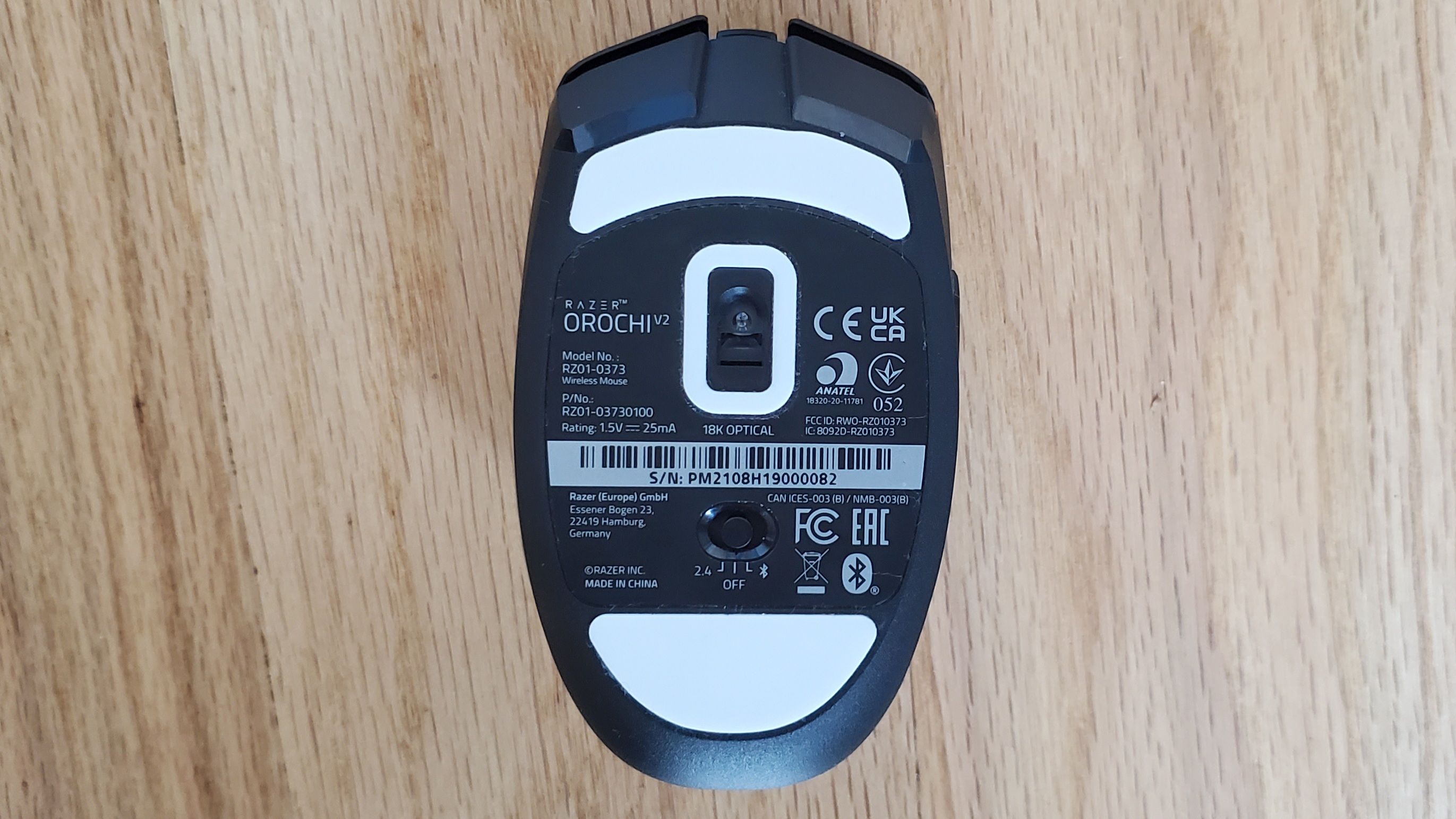
Over the HyperSpeed receiver, the Orochi V2 polls at up to 1000 Hz. Bluetooth uses less power and is fine for laptop work, while 2.4 GHz is the mode for games where input delay counts. A slider on the bottom switches between them.
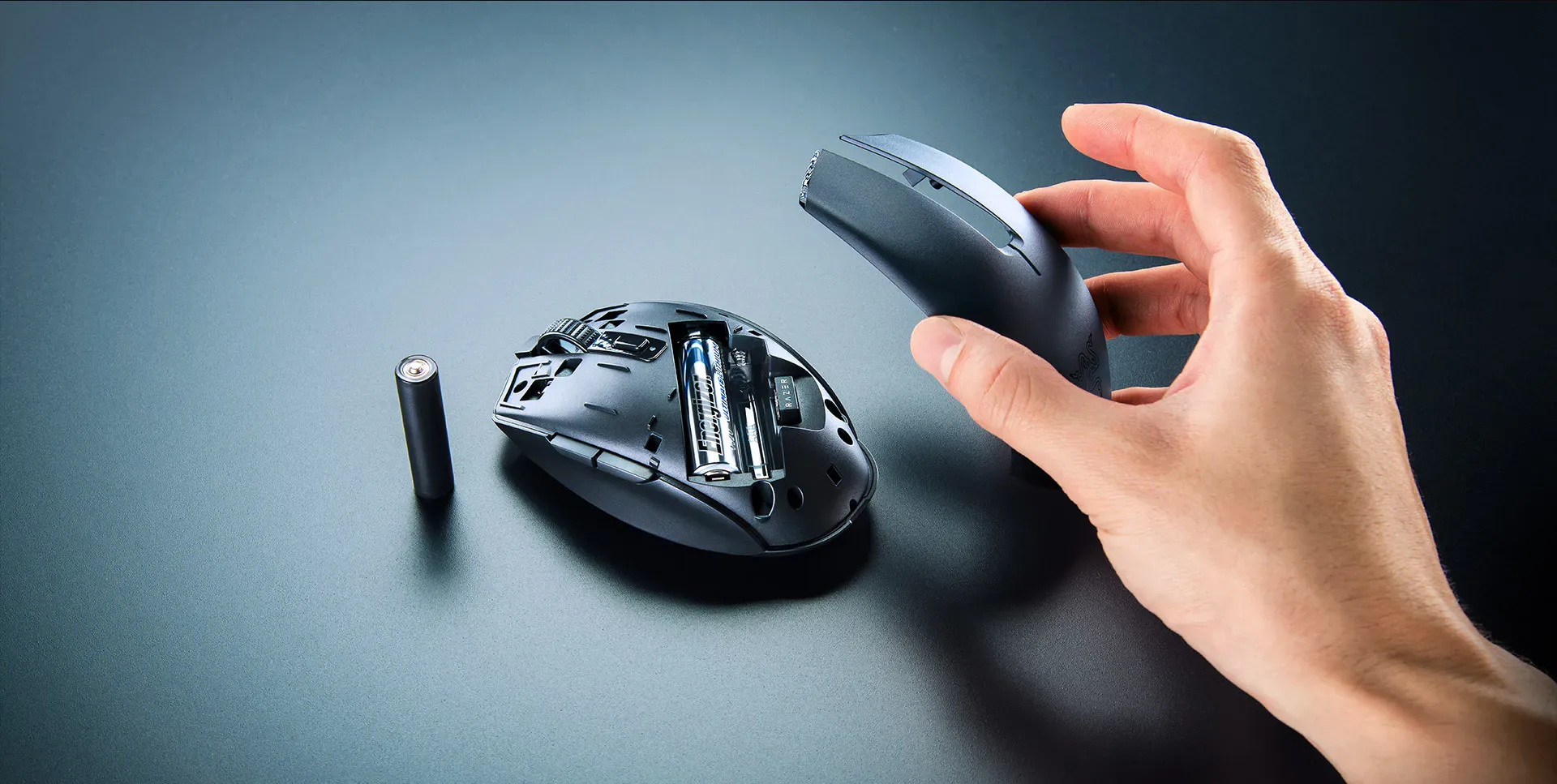
Lift off the top shell and you'll find the hybrid battery compartment that shapes the whole design. It holds one AA or one AAA (not both), and it runs across the chassis so the weight sits nearer the middle. The USB-A receiver stores under the shell as well, so the dongle has a home whenever the mouse goes in your bag.
Razer rates the original Orochi V2 for up to 950 hours on Bluetooth and 425 hours on HyperSpeed, both with a lithium AA. Treat those as best-case figures. A AAA saves weight but needs changing sooner, so if you want the longest gap between swaps, use a lithium AA.
One thing to check before you buy: Razer now also sells a refreshed Orochi V2 (2026), model RZ01-0569, with a higher battery rating of up to 1,100 hours. This review covers the original model, RZ01-0373, which is the version our Check Price button goes to. The model number appears on the retail listing, so it's easy to confirm which one you're getting.
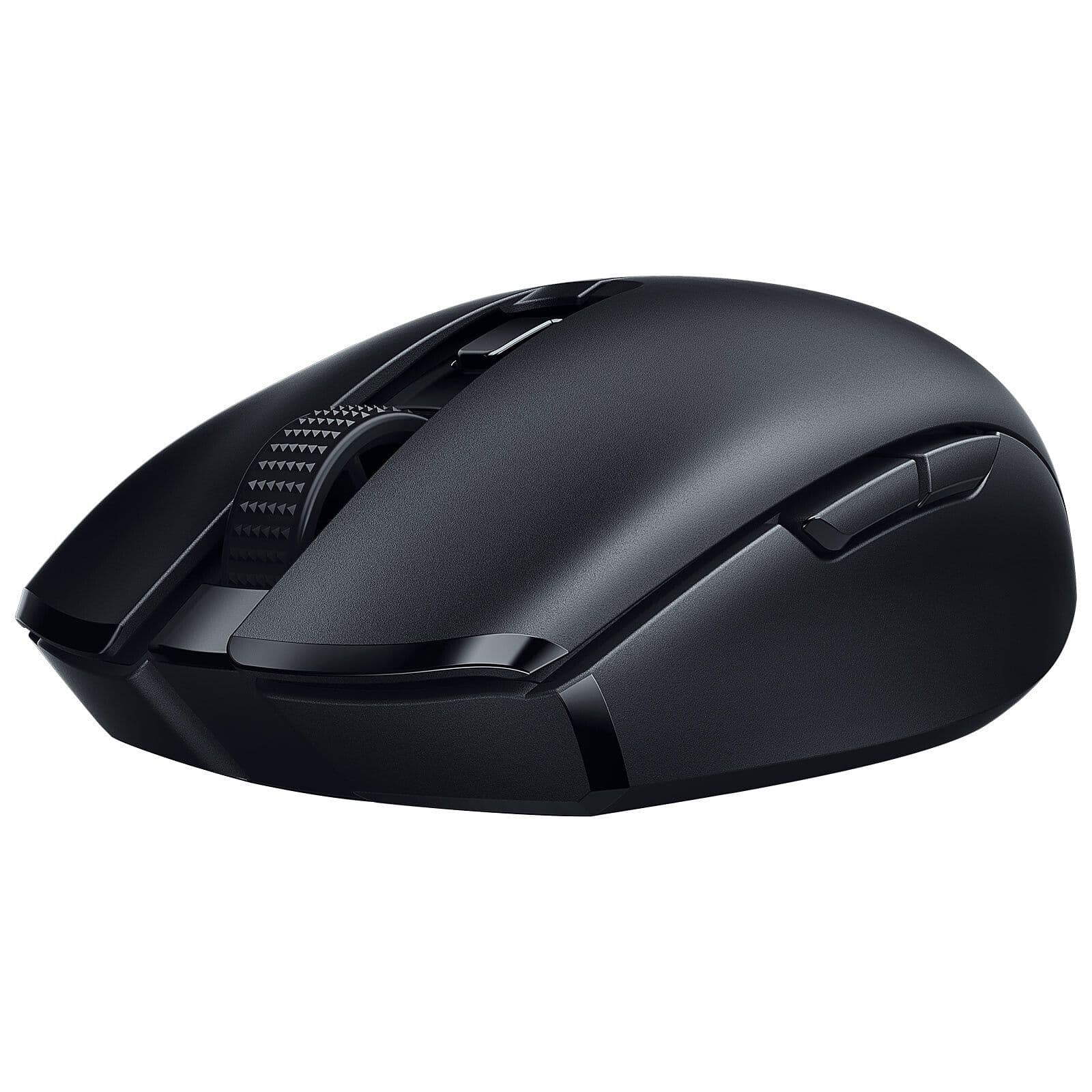
The body measures 108 x 60 x 38 mm, noticeably shorter than a full-size gaming mouse. The outline is symmetrical, but the side buttons sit only on the left, so it's a right-handed mouse. The raised rear gives a claw grip something to brace against.
Six buttons are programmable in Synapse 3. The main clicks use Razer's second-generation mechanical switches, rated for 60 million clicks, with gold-plated contacts to resist wear. The top is solid rather than honeycombed, and PTFE feet sit underneath.
Key Specs and Compatibility
All figures below are for the original Orochi V2 (RZ01-0373).
Specification
Value
Sensor Type
Razer 5G 18K Optical
Maximum DPI
18,000 DPI
Tracking Speed
450 IPS
Acceleration
40G
Weight
Under 60 grams, excluding battery
Dimensions
108 x 60 x 38 mm
Connectivity
2.4 GHz HyperSpeed Wireless / Bluetooth
Battery Compatibility
1x AA or 1x AAA
Rated Battery Life
Up to 950 h (Bluetooth) / 425 h (HyperSpeed), lithium AA
On Windows, Synapse 3 handles DPI stages and button mapping, but you don't need it for everyday use. Plug in the USB-A receiver or pair over Bluetooth and the mouse works straight away.
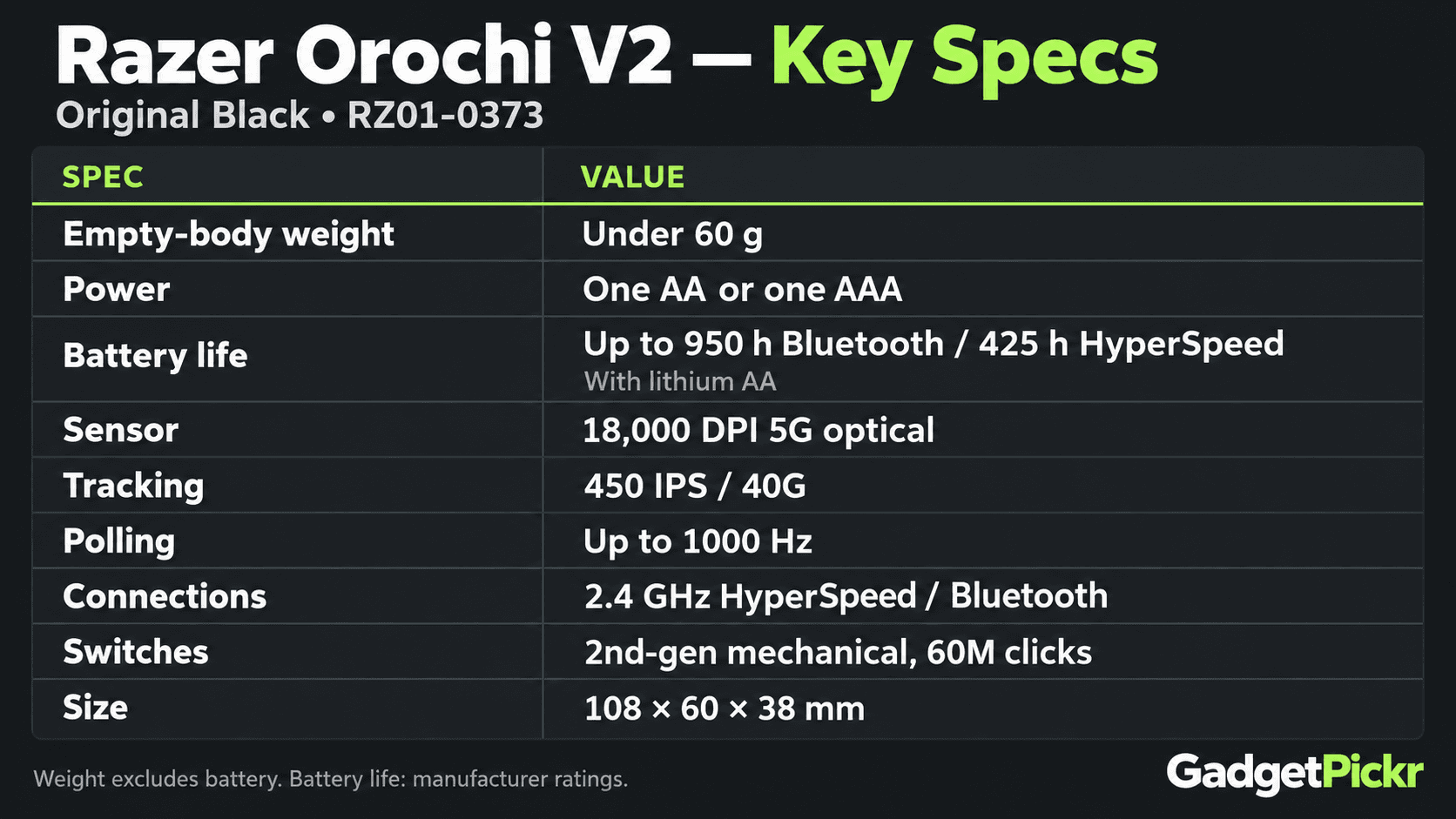
Read the table as a whole and the split is clear: the sensor and polling specs are there for gaming, while the size, weight, and receiver storage are there for travel.
Strengths
Size comes first. At 108 mm, the Orochi fits a cramped hotel desk or a small laptop sleeve far more easily than a full-size mouse. Fingertip users can move it without much shell under the palm, and claw users with smaller hands get support from the raised back.
The hybrid battery slot is the feature rivals don't match. Most wireless mice lock you into one battery size or a sealed rechargeable pack. This one takes an AA or a AAA, and because the slot is centered, neither choice makes the mouse tail-heavy. Pick the AAA when weight matters most and the AA when runtime does. Swapping takes no tools: lift the top, change the battery, put the top back on.
Bluetooth and HyperSpeed each have a job. Pair your work laptop over Bluetooth, then flip the slider and plug in the stored receiver when you sit down at your gaming PC. Bluetooth more than doubles Razer's rated runtime, so leave it there whenever you're not gaming. HyperSpeed gives you 1000 Hz polling, the same report rate as plenty of conventional gaming mice, and for play that matters more than the big DPI number.
A closed shell, PTFE feet, and a home for the receiver are small details that pay off on the road. With no holes on top, there's nowhere for crumbs or bag lint to collect, and lifting the top gets you to the two things you're most likely to need away from home: the battery and the dongle.
It should also last. The main switches are rated for 60 million clicks, and because the power source is replaceable, an aging battery never means buying a new mouse. How long it holds up in practice still depends on how hard you use it.
Weaknesses
The short body is the main reason to look elsewhere. Across 108 mm, a large hand in a palm grip has nowhere to settle, and the raised back can't make up the missing length. Medium or large hands using a fingertip grip are a different story.
Batteries take planning. With no USB charging or wired fallback, a dead cell stops you until you find another AA or AAA. Razer specifies lithium or alkaline cells, and disposables add cost and waste over time. Heavy HyperSpeed gaming also drains them much faster than the Bluetooth rating suggests, and a AAA shortens that further.
The weight advantage shrinks once a battery goes in. Independent measurements put the mouse in the mid-80-gram range with an AA installed. That's still lighter than the G305's listed 99 grams, but the gap is smaller than the shell-only figure suggests.
There's no RGB at all, and no weight kit. Razer put its power budget into battery life, which suits an office or a travel bag but drops a feature many gaming mice include. The battery you choose is your only way to adjust the weight.
Razer doesn't list a receiver extension cable in the box. If your PC tower sits on the floor, the small USB-A dongle has fewer placement options than a receiver that ships with an extender. Bluetooth gets around this for work, but HyperSpeed gaming still needs the dongle.
None of these are dealbreakers for the right buyer. They do make the Orochi a specialist: the compact shape, swappable battery, and dual wireless only pay off if they match how you work and play.
Best Alternatives
The two comparisons worth making are Logitech's G305 Lightspeed and the SteelSeries Rival 3 Wireless. Both are established wireless gaming mice that run on disposable batteries, but their shapes and battery layouts point them at different buyers.
Go with the Logitech G305 Lightspeed if you want a longer 116.6 mm, 99-gram mouse for a gaming PC that stays put. It takes one AA only and has no Bluetooth.
Go with the SteelSeries Rival 3 Wireless if you want a longer 120.6 mm body, a lit scroll wheel, and both Bluetooth and 2.4 GHz. It runs on one or two AAA batteries, which keeps it heavier than the Orochi, and dropping to a single cell cuts the runtime.
The G305 suits a fixed gaming desk, and the Rival 3 fills more of your hand while keeping two wireless modes. Pick the Razer when a shorter shell and the AA-or-AAA choice matter most.
Who Should Buy It
Anyone whose mouse moves between a laptop and a gaming PC. Bluetooth keeps a USB port free while you work, the stored receiver handles gaming, and one battery powers both with no charging cable to pack.
Your grip matters more than the 18,000 DPI spec. Fingertip grippers with medium or large hands, and claw or palm grippers with smaller hands, suit this shape best.
Frequent travelers get the most out of it. Keep one spare cell with the mouse and a dead battery becomes a quick fix instead of a hunt for a charging cable, as long as you remember to pack the spare.
Commission may be earned from this link, at no extra cost to you.
Who Should Skip It
Large-handed palm grippers. Your fingers will hang past the buttons, and you'll be gripping a mouse that's shorter than your hand wants.
Anyone who wants USB charging. The Orochi V2 can't charge or run over a cable, so if keeping spare batteries around sounds like a chore, a mouse with an internal battery will suit you better.
RGB and customization fans. There's no lighting and no weight system beyond the battery you pick.
Single-desk users who never need Bluetooth. Most of the travel design goes unused, and a larger mouse like the G305 will likely fit your hand better.
Sources & References
Specifications and claims in this analysis were cross-referenced against the sources below.
No. There's no built-in rechargeable battery and no USB port. It runs on one lithium or alkaline AA or AAA battery, which you replace when it runs out.