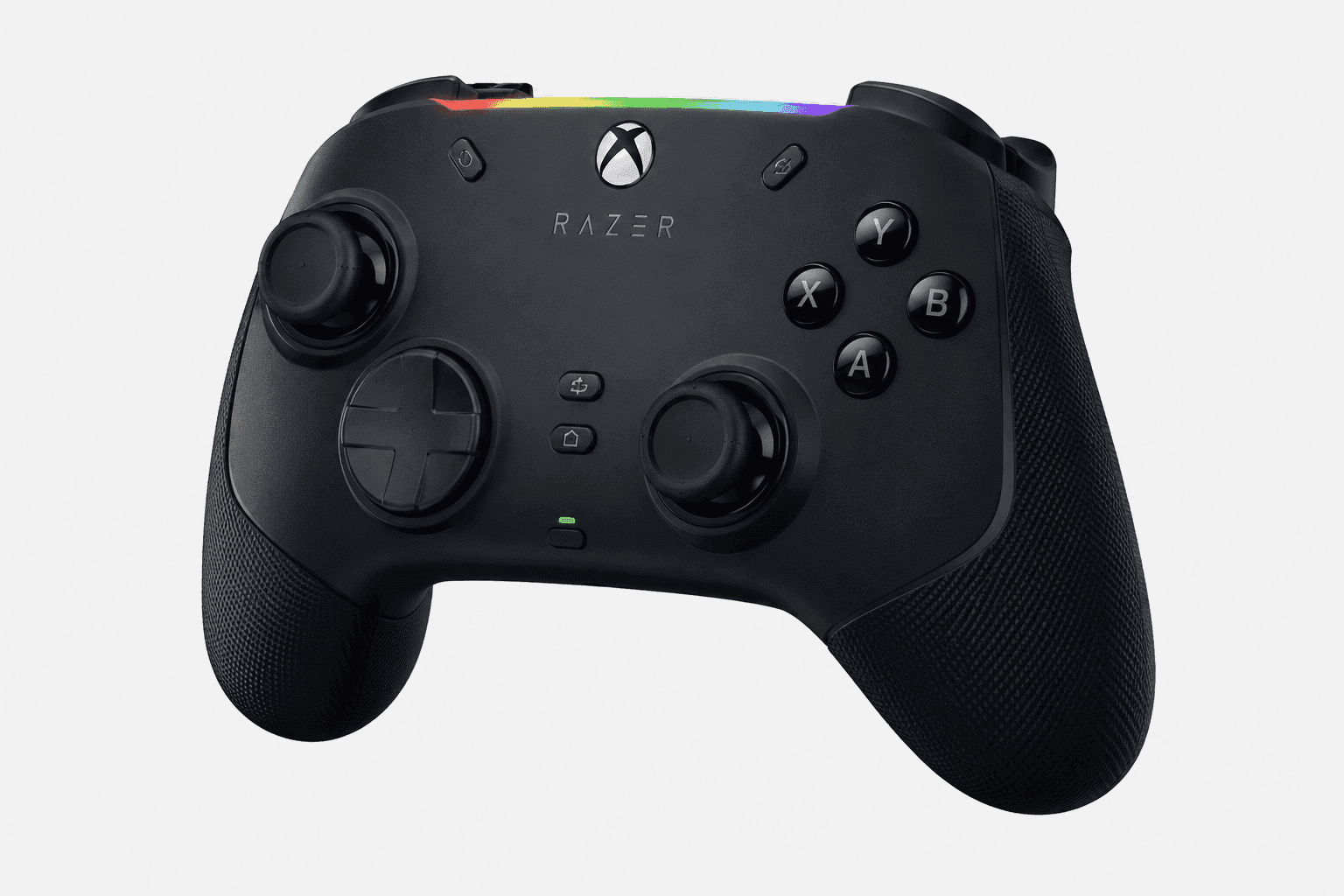
A Razer Wolverine V3 Pro 8K look covering its 8000Hz polling wired and wireless on PC, TMR Hall Effect thumbsticks, and how it stacks up against the Xbox Elite Series 2 and GameSir G7 Pro.
Picking a controller for competitive PC play comes down to three things: how fast it talks to your rig, how the sticks hold up over time, and whether the button layout actually helps you win in the moment. That's the lens for this Razer Wolverine V3 Pro review — a look at where Razer's flagship PC pad lands next to long-running rivals like the Xbox Elite Series 2 and the Scuf Instinct Pro.
Unlike a standard console gamepad, this controller chases raw speed: magnetic sensors, an unusually high polling rate, and a layout built to shave milliseconds off your reaction time. For PC players specifically, the way it talks to Windows — at 8000 Hz, wired or wireless — is a real departure from how most gamepads communicate with a modern operating system. Below, we break down the hardware, the ergonomics, and the platform compatibility, so you can decide whether the price buys you something you'll actually feel in a match.
Some links in this article are affiliate links, which helps support GadgetPickr at no extra cost to you.
The Quick Take
The Wolverine V3 Pro carves out a place among the top PC esports controllers by pairing TMR Hall Effect thumbsticks with genuinely low-latency wireless. That stick tech alone tackles one of gaming hardware's most annoying problems: drift. Add in a polling-rate ceiling built for competitive play, and you get a pad trying to solve real problems rather than just look expensive.
This Razer Wolverine V3 Pro review keeps coming back to the same two ideas: TMR Hall Effect thumbsticks that solve stick drift at the hardware level, and an 8000 Hz PC polling rate that puts input latency in a different league than most gamepads. Combined with an 8000 Hz rate that holds up wireless and six remappable buttons, this is a controller built around speed, durability, and customization rather than flash. That performance comes at a price positioned well above the GameSir G7 Pro, so it's a real investment rather than an impulse buy. If you mainly play on console, or you're not in competitive multiplayer often enough to feel the difference, the GameSir G7 Pro Wireless Gaming Controller — with its own TMR joysticks and a 1000 Hz polling rate — makes more financial sense. But if you're a competitive PC gamer chasing every millisecond of input precision, the Wolverine V3 Pro justifies its cost with hardware that backs up the marketing. Buy it for the speed and the durability; skip it if you're not the player this controller was actually built for.
Start with the thumbsticks, because that's clearly where Razer put its engineering budget. The Wolverine V3 Pro swaps in Tension-Modulated Ring (TMR) Hall Effect sensors instead of the carbon-film potentiometers most controllers still rely on. Potentiometers wear down through physical contact — that's the actual mechanical root of stick drift.
TMR sensors read magnetic field changes instead, so there's no physical contact to wear out. Centering stays consistent over years of use rather than months. For anyone making fine aim adjustments in an FPS, that translates to a stick that behaves the same way on day 900 as it did on day one.
Then there's the polling rate, the number Razer leads with in its marketing. Connected to a PC, by cable or through its wireless dongle, it reports input at 8000 Hz — eight thousand times per second. Most wireless pads sit at 125 Hz or 250 Hz, so this is a dramatic jump in communication frequency, and your button presses and stick movements register almost instantly rather than waiting on the next polling cycle. Razer's headline is that the rate holds without the cable: over its HyperSpeed wireless dongle the controller still polls at 8000 Hz, which Razer bills as its first native 8000 Hz wireless esports controller.
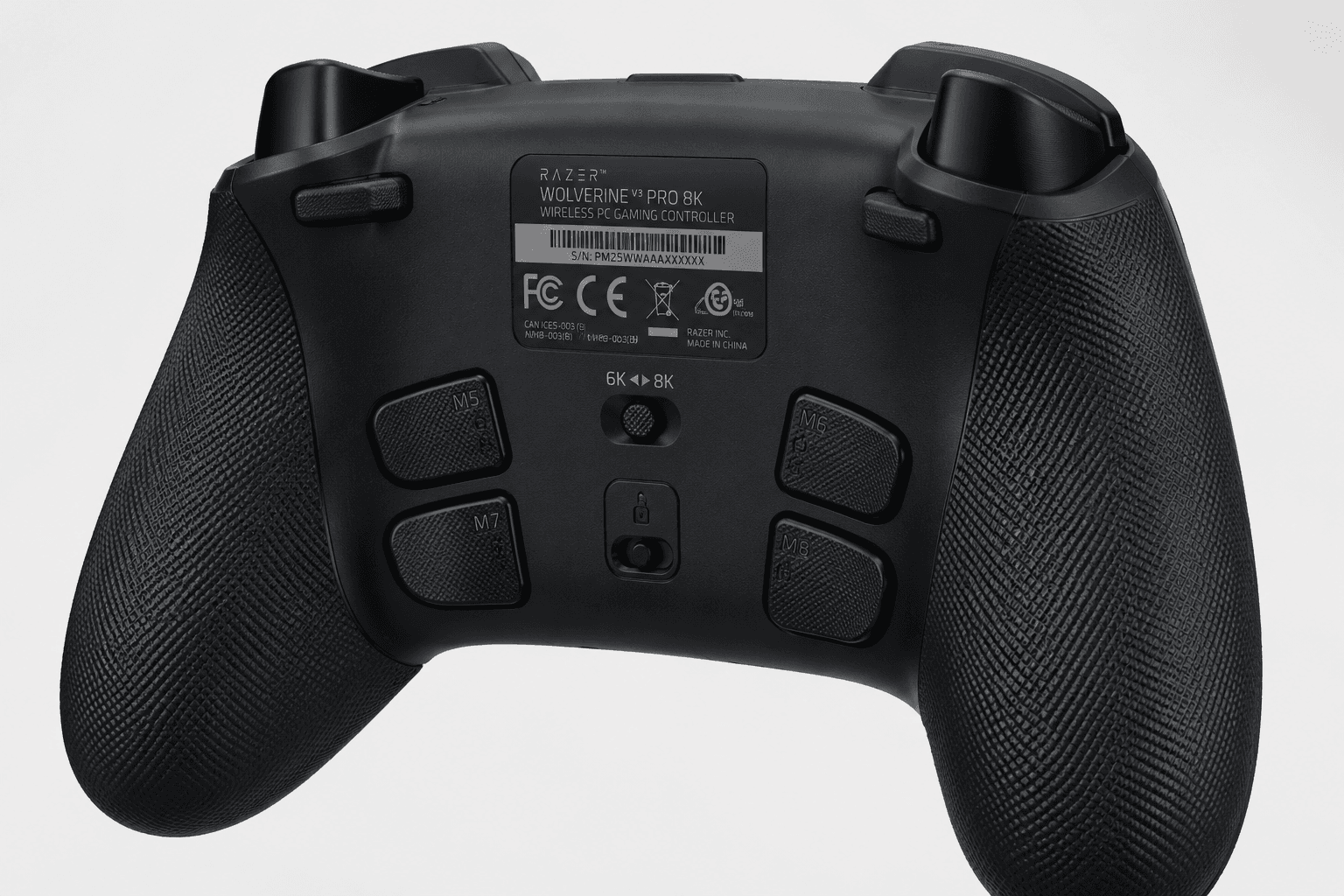
Razer doesn't publish a battery-life figure on its product page, and third-party numbers disagree widely, so treat any single figure with caution; the included cable charges it while you play. On the chassis itself, Razer built in six remappable buttons — four back paddles plus two extra bumpers positioned near the triggers. That's real estate for binding jump, reload, or weapon-swap commands without ever taking your thumbs off the sticks.
The overall shape follows the familiar asymmetrical Xbox layout, but the internals are a bigger departure. Razer uses tactile microswitches for the face buttons, providing a distinct mechanical click and a shorter actuation distance. That's a real change from the membrane buttons most gamepads still ship with, and it's the kind of detail that only shows up once you start comparing spec sheets side by side.
Key Specs and Compatibility
On the ecosystem side, this is a PC controller. Razer lists Windows 11 as the requirement and Razer Synapse 4 for remapping and stick tuning; the Xbox-licensed model is the separate, non-8K Wolverine V3 Pro, so Xbox Series X|S players should look at that one instead.
Connectivity comes down to two options: Razer's HyperSpeed wireless dongle or the included 2 m USB-C cable, and both run at the full 8000 Hz on PC. Simple enough on paper, and it means you're never locked into one mode for an entire session.
Zoom out and the competitive set here is the Xbox Elite Series 2, the Scuf Instinct Pro, and the DualSense Edge. The Elite Series 2 still leans on traditional analog sticks that wear out over time; the Wolverine sidesteps that with TMR Hall Effect sensors instead, and its 8000 Hz PC polling rate dwarfs the 125–250 Hz range most console-first controllers ship with. Sony's answer to stick wear, the DualSense Edge, uses swappable stick modules — a fix, but one that requires spare parts and an actual repair step down the line.
Razer's approach skips the maintenance cycle entirely by using sensors that don't physically wear. Net result: a controller built for PC-first players who care more about durability and raw input speed than console-native extras.
What Stands Out
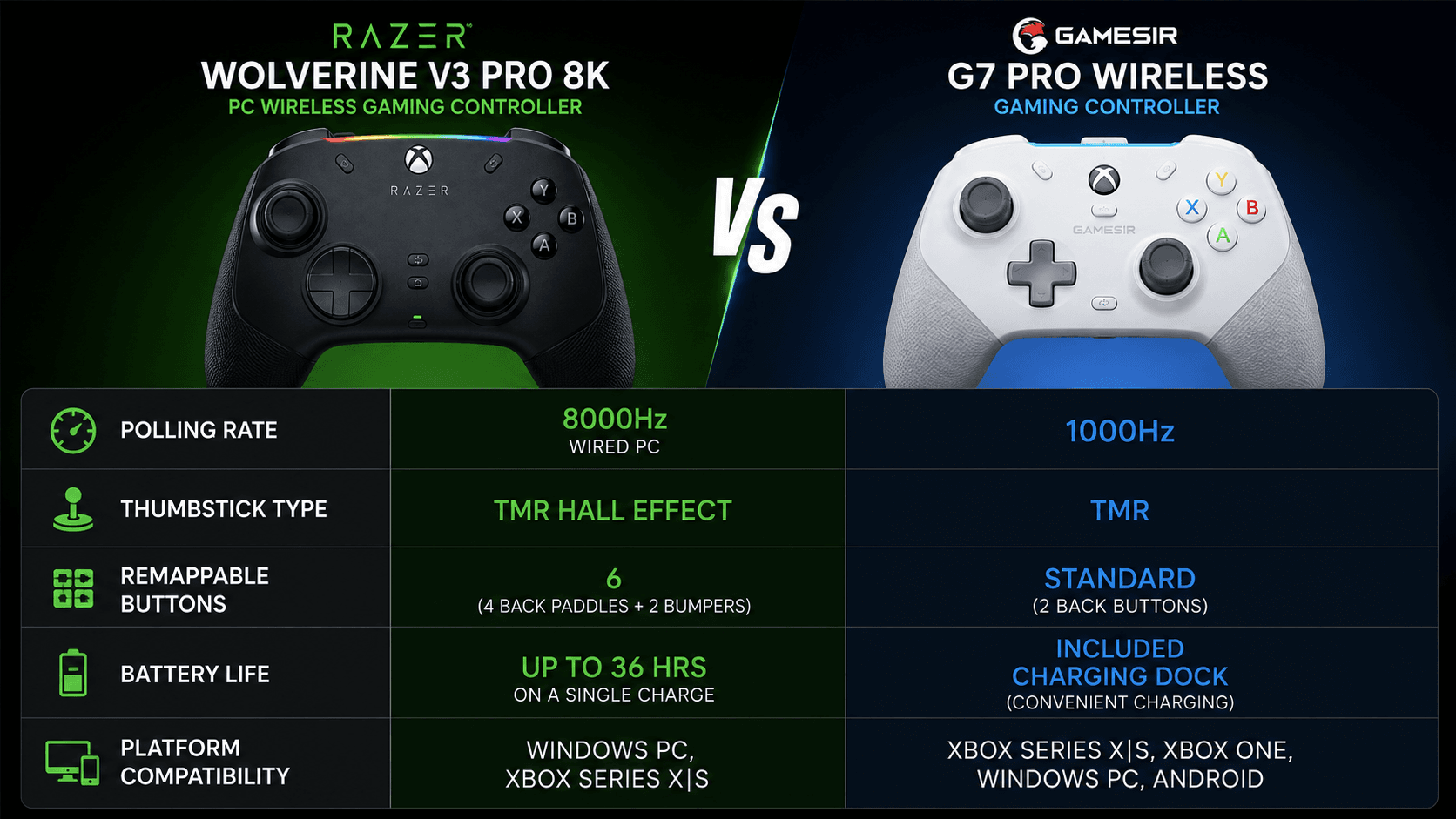
The single spec that gets Wolverine V3 Pro conversations started is the 8000 Hz polling rate on PC, wired or wireless. Standard wireless controllers run at 125–250 Hz. Even the GameSir G7 Pro, itself a fairly serious wireless pad, tops out at 1000 Hz. An 8000 Hz reporting rate puts this controller in the same input-speed conversation as dedicated esports mice — territory gamepads don't usually get to claim.
Then there's the TMR (Tunneling Magnetoresistive) Hall Effect stick technology, arguably the more durable win of the two. These magnetic sensors avoid the physical contact that wears out standard potentiometers, so drift becomes far less of a long-term concern. TMR also tends to deliver a smoother tension curve than plain Hall Effect sensors, which keeps small aim corrections consistent instead of getting lost in a dead zone.
Layer on six remappable buttons — four back paddles built into the grip plus two bumpers by the triggers — and Razer's tactile mechanical switches on the D-pad and face buttons, and you get inputs that feel closer to a mouse click than a typical membrane press. The inclusion of physical trigger stops allows users to instantly toggle between a long, smooth pull for racing games and a short, instantaneous click for shooters. Add a cable that charges it while you play, and a flat battery never has to end a session.
Strengths
Day to day, the Wolverine V3 Pro earns its keep by adapting cleanly across genres instead of being a one-trick FPS tool. In fast-paced shooters, the mouse-click face buttons paired with the trigger stops turn the controller into something closer to a rapid-fire instrument, since minimal travel per press means less time between input and action on screen. Those six remappable buttons sit right where your fingers already rest, so you can bind jump, slide, or reload without breaking into an awkward claw grip.
The TMR sticks back this up with strong centering accuracy and no meaningful dead zone, based on the published spec sheet. In tactical shooters and racing sims — where a couple of degrees of stick travel actually matters — that frictionless glide keeps tracking consistent instead of drifting off target over a session.
The wireless 8000 Hz is what stretches the practical benefit further. Many high-polling pads make you choose between a cable and full speed; this one does not, so you can sit back from the desk without giving up the rate you paid for, and plug the same cable in to charge mid-session. Full speed without a cable, on PC, is basically the whole pitch in one sentence.
Weaknesses
None of this comes free, and the trade-offs are worth knowing before you buy. The biggest one: this is a PC-only controller. Razer lists Windows 11 as the requirement, so console players need the separate Xbox model, which does not have 8000 Hz. And on PC, the gain from 8000 Hz polling is smallest on modest systems and in slower-paced games, which makes the premium harder to justify if you are not playing competitively.
Ergonomics take some adjustment. Razer keeps the weight to about 220 g, and while the layout is solid overall, the extra bumpers near the triggers take some relearning and could feel cramped if you have larger hands.
Remapping leans hard on a companion app, too; there's no onboard profile screen for on-the-fly changes away from a PC or console menu. And with no battery-life figure from Razer, heavy wireless users should expect to charge it more often than a simpler pad. If you don't need 8K polling and just want something light and plug-and-play, this feature density starts to look like overhead rather than a benefit.
Best Alternatives
Shopping around before committing is smart, and the Wolverine V3 Pro has real competition. The closest premium rival is the Xbox Elite Series 2, which counters with a fully customizable chassis, adjustable-tension thumbsticks, and a carrying case. What it doesn't have is drift resistance, since its analog sticks are the traditional kind that wear over time. The Wolverine trades that flexibility for TMR magnetic sticks and an 8000 Hz PC polling rate the Elite Series 2 simply can't match, which tips the scale toward Razer for anyone chasing input speed above all else.
For a lighter investment, the GameSir G7 Pro Wireless Gaming Controller is the practical pick. Priced below the Wolverine V3 Pro, it still runs TMR joysticks and a 1000 Hz polling rate, plus broad compatibility across Xbox Series X|S, Xbox One, Windows PC, and Android — and it ships with its own charging dock in the box. It won't touch 8000 Hz, but 1000 Hz is still fast enough for the vast majority of competitive play, which makes the G7 Pro the better call for multi-platform gamers who don't need the absolute ceiling.
If you're PlayStation-first, none of this matters much anyway. The DualSense Edge is the obvious pick there, with modular stick replacements and tight system integration. But for PC-focused competitive players specifically, the Wolverine V3 Pro still leads the pack on pure technical specs: the 8K polling rate and six remappable buttons add up to a real mechanical edge in fast shooters and esports titles.
Who Should Buy It
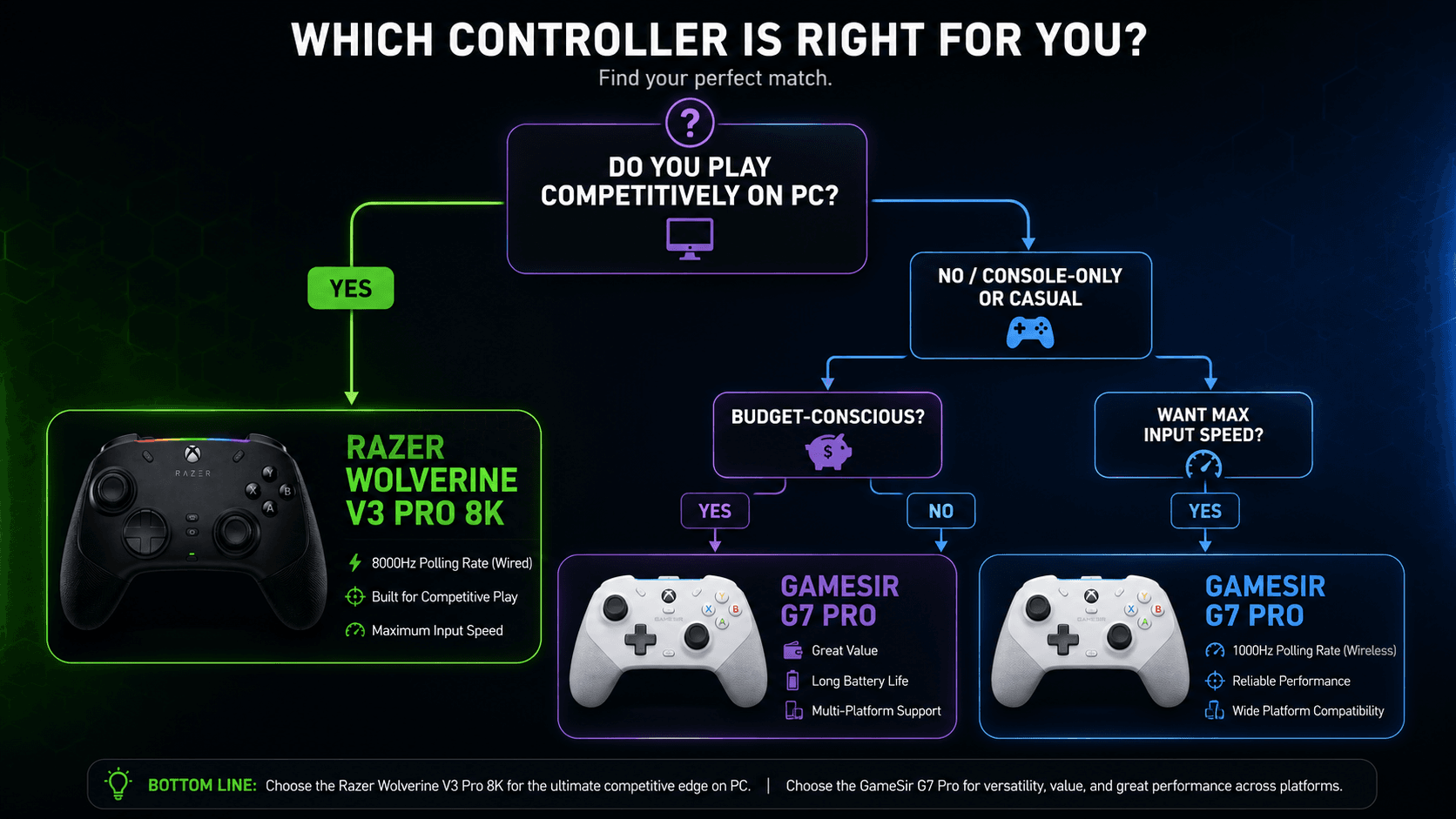
This one is built for competitive PC players and esports regulars who want input latency as close to zero as physically possible. If your games are fast-paced shooters, fighting games, or battle royales, where a few milliseconds decide fights, the 8000 Hz PC polling rate is the reason to pick this over almost anything else in the category. It puts the controller's response speed in the same conversation as dedicated gaming mice.
It's also the right call if you're done replacing sticks every year or two. TMR magnetic thumbsticks resist the physical wear that eventually kills traditional ALPS potentiometers, so this is as much a durability purchase as a performance one. The included cable charges it mid-session, and the six remappable buttons give competitive players enough of an ergonomic edge to keep both thumbs on the sticks through an entire match.
Commission may be earned from this link, at no extra cost to you.
Who Should Skip It
Not every gamer needs this. If you're mostly playing single-player RPGs, platformers, or story-driven games, the 8000 Hz polling rate and the entire competitive feature set are overkill you'll likely never use. The premium price is difficult to justify if competitive multiplayer isn't where you spend most of your time.
Console players should look elsewhere: this model is built for Windows PCs, so Razer's Xbox-licensed Wolverine V3 Pro, a more affordable wireless pad, or a first-party controller will serve you better. And if budget is the deciding factor, the GameSir G7 Pro covers the TMR-stick, drift-resistant fundamentals for meaningfully less money.
Sources & References
Specifications and claims in this analysis were cross-referenced against the sources below.
Yes. It connects through Razer's HyperSpeed wireless dongle and keeps the full 8000 Hz polling rate on PC without a cable. The included USB-C cable is for wired play and charging.