Xbox Elite Series 2: Deep Customization, Old Polling
A look at the Xbox Elite Controller Series 2: adjustable stick tension, four metal paddles, three-stage trigger locks, a 40-hour battery, and where it loses ground to newer TMR and high-polling-rate rivals.
Serious controller shopping tends to end in the same place: a shortlist of expensive pads promising tighter sticks, faster triggers, and buttons positioned so your thumbs never have to leave the aiming stick. Microsoft's Xbox Elite Wireless Controller Series 2 sits at the head of that list, built around adjustable thumbstick tension, swappable rear paddles, and pairing across Xbox Series X|S, Windows, and mobile. Does that hardware earn its keep in 2026? That is what this Xbox Elite Controller Series 2 review sets out to answer. What follows works through the official hardware specifications, the internal battery architecture, and the physical modification mechanisms, then measures the pad against rivals like the Scuf Instinct Pro and Sony DualSense Edge. Spend a few minutes with the structural details and you will know quickly whether this customizable gamepad suits your playstyle — or whether your money belongs somewhere cheaper.
Some links in this article are affiliate links, which helps support GadgetPickr at no extra cost to you.
The Quick Take
Deep physical customization, cross-platform range, and up to 40 hours per charge keep the Elite Series 2 near the top of the controller pile — provided you value mechanical adjustability over raw polling speed.
Verdict
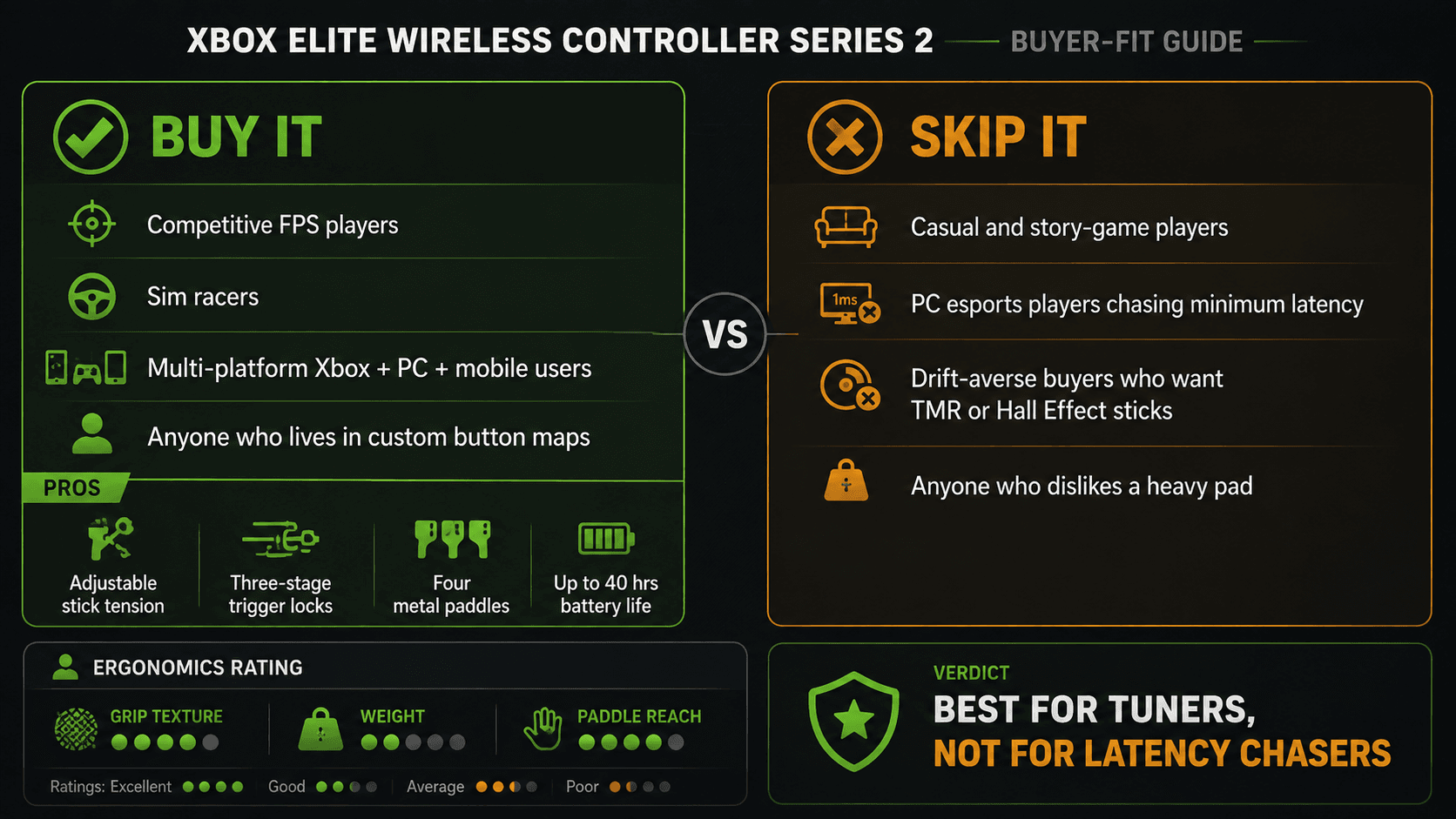
Buy the Elite Series 2 if you want to physically tune how a controller behaves and use it on more than one platform — nothing else pairs adjustable-tension thumbsticks, three-stage trigger locks, four metal paddles, and three onboard profiles with native Xbox and Windows support. Skip it if input latency on PC is your single priority, because its wireless polling ceiling puts it behind the 1000Hz and 8000Hz field no matter how good the ergonomics are.
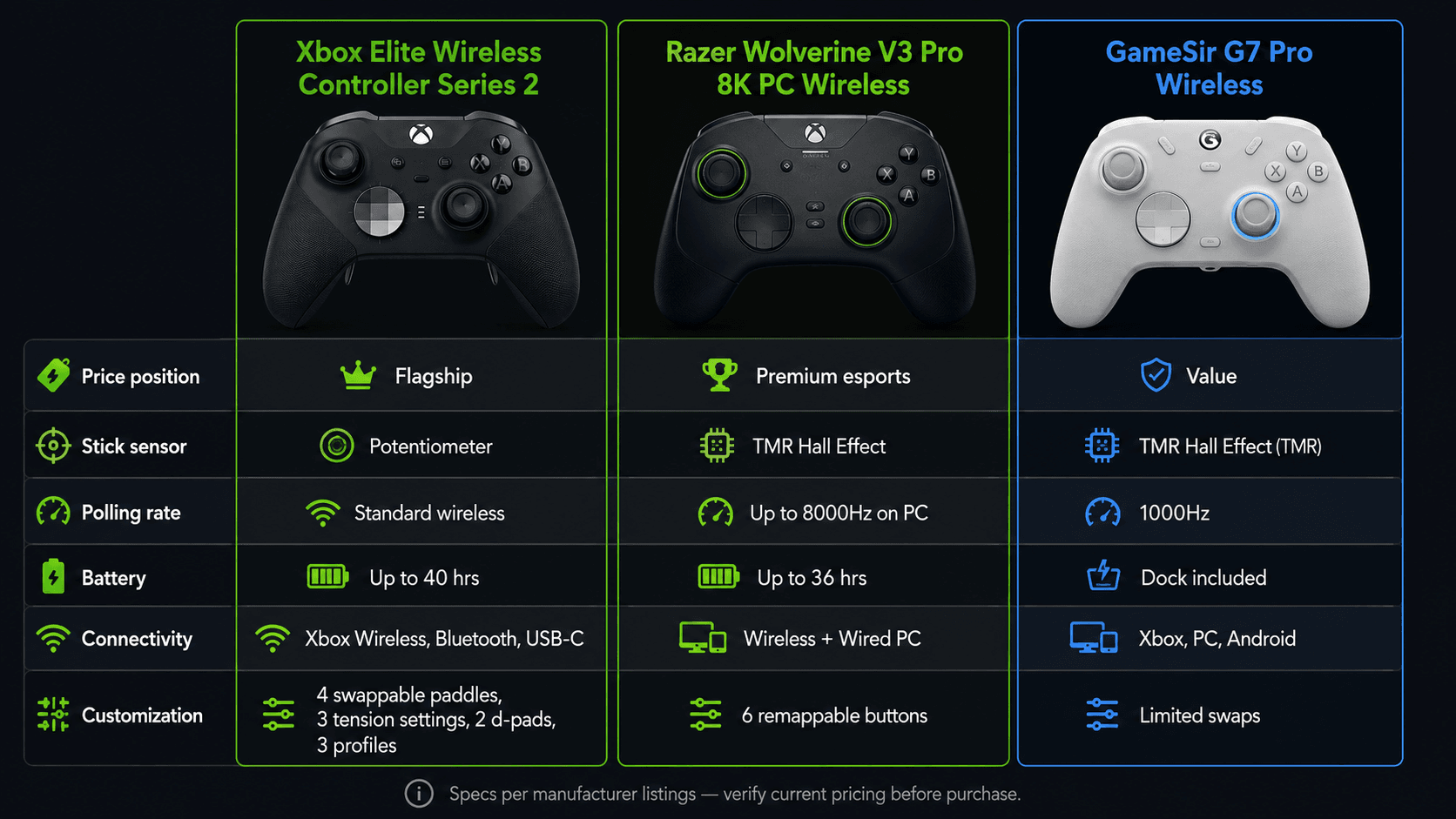
Battery is the other reason it holds its position. Up to 40 hours on a single charge removes both the tether and the recharge anxiety from long sessions, and compatibility across Xbox Series X|S, Xbox One, Windows PC, iOS, and Android keeps one control scheme with you everywhere. Competition has narrowed the gap, mind you: the Razer Wolverine V3 Pro 8K targets high-end PC players with far higher polling rates, and the GameSir G7 Pro undercuts the Elite substantially while offering TMR joysticks.
Closing out this Xbox Elite Controller Series 2 review: the pad remains the right call for core console and PC gamers who value physical adjustability, long runtime, and metal-and-rubber construction over headline polling numbers. Want one gamepad that moves from couch to desktop to phone without changing how it feels? The Series 2 still assembles the most complete customizable package on the shelf.
Xbox Elite Controller Series 2 Review: Product Overview
Modularity is the entire point here. Microsoft wrapped the chassis in rubberized grips that run around the handles, cutting slippage during long sessions and giving the shell a texture instead of a shine. The centerpiece is the pair of adjustable-tension thumbsticks, which move between three mechanical resistance settings using a bundled tuning tool. Aim-heavy shooters are the obvious beneficiary: you decide how much force it takes to push the stick and how hard it fights back.
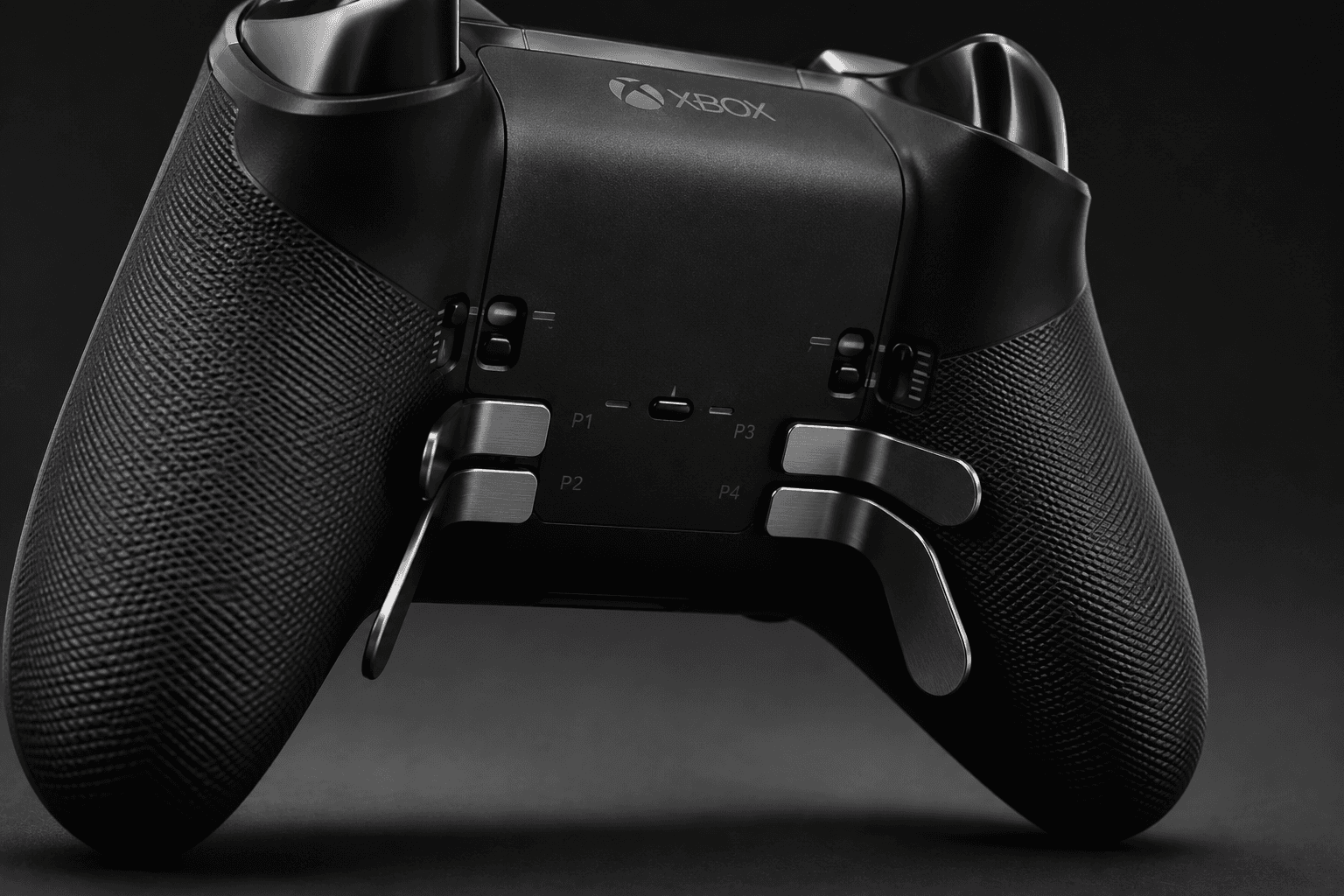
Triggers get similar treatment. Three-stage hair trigger locks sit on the back shell as physical sliders that cut how far each trigger travels before it registers — useful with high-rate-of-fire weapons, where every millimetre of unused throw is wasted motion. Need the full analog sweep for throttle control in a racing sim? Slide the locks back and the range returns. Flip the pad over and there are four modular slots for interchangeable metal paddles, each mappable to a face button, a directional pad input, or a bumper, so reloading or jumping never pulls a thumb off a stick.
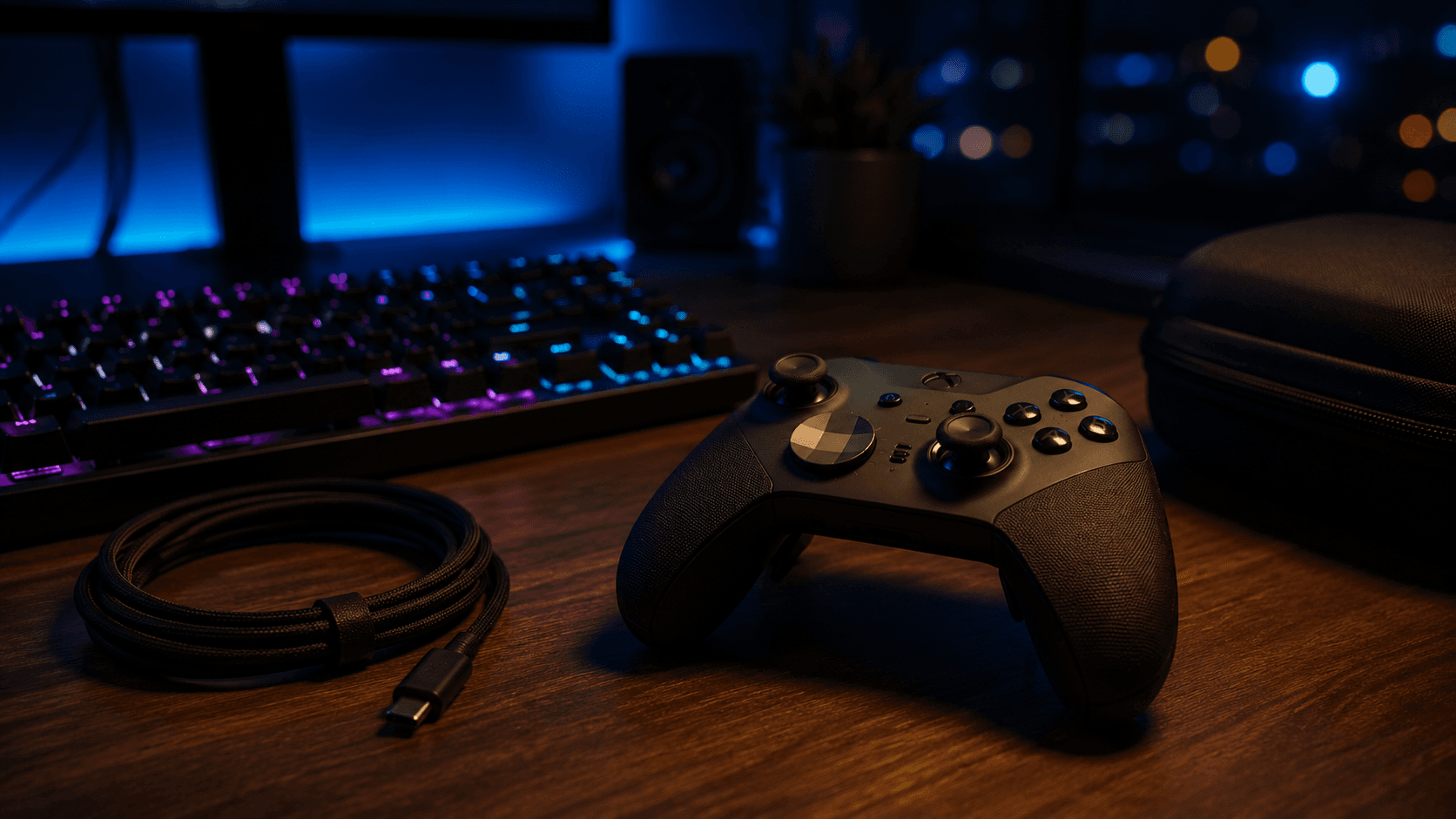
Onboard memory holds three custom remapping profiles alongside the default, switched instantly through the profile indicator button on the front face. Power marks the sharpest break from the previous generation. Out go removable AA cells; in goes an internal lithium-ion pack rated for up to 40 hours of continuous operation per charge. You top it up with the included USB-C cable or by dropping the pad into the magnetized dock that lives inside the carrying case. Connectivity spans Xbox Wireless, standard Bluetooth, and wired USB-C, which means direct pairing with Xbox Series X|S, Xbox One, Windows PCs, and iOS or Android devices. One pad, most of your screens.
Key Specs and Compatibility
Here is the hardware in plain numbers, drawn from Microsoft's published specifications rather than marketing copy.
Specification
Value
Battery Life
Up to 40 hours (Internal Lithium-Ion)
Wireless Connectivity
Xbox Wireless, Bluetooth
Wired Connectivity
USB-C
Platform Compatibility
Xbox Series X|S, Xbox One, Windows PC, iOS, Android
Integration runs deepest inside the Xbox hardware ecosystem and the Xbox Accessories app on Windows, while standard Bluetooth pairing keeps the gamepad usable on phones and non-Xbox desktops.
What Stands Out
Mechanical adjustment is the reason this controller exists. Using the included metal tuning tool, players can switch between three distinct resistance levels: standard Xbox One tension, a firmer setting matching the original Xbox 360 pad, and an extra-firm tension designed for fine-aim precision in competitive shooters. Crank it to the firmest position and small over-corrections during long-range tracking become much harder to make. Behind that, the three-stage hair trigger locks shorten the distance to actuation, speeding up shot delivery in twitch titles while the full analog throw stays one slider away for racing.
Swappable parts extend well past the sticks. The package includes metal thumbstick caps in different heights and dome shapes, plus two directional pad options: a faceted metallic dish for sweeping multi-directional inputs and a conventional cross. Four remappable stainless-steel paddles sit flush against the grips at the back, bound to face buttons, bumpers, or stick clicks through the Xbox Accessories software on Xbox Series X|S and Windows PC. Jump, slide, reload — none of it costs you your aim.
Battery is the quiet win. Forty hours of continuous gameplay from the internal lithium-ion cell is a different ownership experience from the AA-swapping routine of the standard Xbox controller, and charging runs through the USB-C port on the top edge or the magnetic dock tucked into the hard-shell case. Connection options stack up as well: Xbox Wireless for low-latency console links, Bluetooth and USB-C for quick moves between PC, iOS, and Android. Button maps, stick curves, and trigger deadzones travel with you in the three onboard profile slots, so the configuration you tuned on the couch is waiting at your desk.
Strengths
Where does all this land in practice? In fast-paced titles like Apex Legends or Call of Duty, dialling stick resistance to the maximum tension level buys stability — that extra mechanical drag lets you run higher in-game sensitivity without losing the micro-adjustments that keep a distant target centred. Set the hair trigger locks to their shortest throw at the same time and semi-automatic weapons fire as fast as your finger allows, with less travel and noticeably less fatigue.
Rear paddles rewrite your mapping habits inside an hour. Bind crouch, jump, and weapon swap underneath and the right thumb never leaves the stick to hunt for a face button. Sim racers get a neater trick: put manual gear shifts on the upper pair and you have paddle shifters, roughly where a performance car would put them. Those wrap-around rubberized grips matter here too, holding traction through sweaty stretches where smooth plastic housings start sliding.
Multi-device users squeeze the most out of it. A dedicated profile selector on the faceplate flips between three saved layouts mid-match, with LED indicators showing which preset is live, and a Windows connection over USB-C or the Xbox Wireless Adapter keeps latency low enough for competitive play. Forty hours of charge means you stop thinking about battery at all. The case charges the controller through a pass-through USB-C port, so travel days end with a protected, full gamepad instead of a dead one rattling around your bag.
Weaknesses
Now the trade-offs, and they are real. Start with what sits under the thumbsticks: where newer alternatives such as the Razer Wolverine V3 Pro and GameSir G7 Pro use magnetic TMR (Tunnel Magnetoresistance) or Hall Effect sensors, the Series 2 relies on traditional potentiometer-based thumbstick modules. Potentiometer contacts wear with use, and wear eventually shows up as stick drift or creeping deadzones. For a controller sold as a long-term purchase at this end of the market, the absence of contactless stick sensors is the most conspicuous gap in the current hardware landscape.
Polling rate is the second sticking point for PC players. The Xbox Elite Series 2 operates within standard polling limits over Bluetooth and Xbox Wireless protocols, typically hovering around 125Hz. That is fine for console play and ordinary PC gaming; it is not fine if you are chasing the lowest achievable input latency, where 1000Hz and 8000Hz controllers respond measurably quicker. Weight compounds the issue — the dense internal battery, rumble motors, and metal components add up, and next to a stripped-down wired esports pad this one feels heavy in hand.
Materials age, too. Those rubberized grips are comfortable on day one, but heat and hand oils can lift the adhesive over time, leaving bubbling along the edges. None of this cancels out the adjustability or the depth of Xbox integration. It does mean anyone whose priority is raw PC latency or stick longevity over years of heavy use should study the third-party field hard before committing.
Best Alternatives
Plenty of capable pads circle this one, each trading something away. Razer's Wolverine V3 Pro 8K PC Wireless Gaming Controller chases the esports crowd directly. Its TMR Hall Effect thumbsticks resist drift better than potentiometer joysticks, and its headline feature—an ultra-responsive 8000Hz polling rate on PC—cuts input latency below what Bluetooth or Xbox Wireless can manage. With up to 40 hours of battery life and four remappable paddles, it caters to high-frequency twitch shooters, though it commands a premium position compared to standard gamepads. The trade: you surrender swappable caps, dual d-pads, and Xbox-native profile tooling to gain that speed.
Want most of the sensor technology for less outlay? The GameSir G7 Pro Wireless Gaming Controller is the value play. TMR joysticks and a 1000Hz polling rate put input precision and stick longevity ahead of physical modularity, and it covers Xbox Series X|S, Xbox One, PC, and Android with a charging dock included. The trade: no interchangeable paddle set or thumbstick caps, so what you unbox is what you play for the life of the controller.
PlayStation-centric buyers comparing across ecosystems usually land on the Sony DualSense Edge, which brings ultra-low latency, haptic feedback, and replaceable stick modules — but its battery runs roughly 5 to 7 hours against the Elite's 40-hour rating. The trade there is ecosystem rather than features: the Edge belongs on a PS5, while the Series 2 offers deeper native integration on Xbox and Windows, and PC competitive purists will still lean toward the Wolverine's raw speed.
Who Should Buy It
Buy it if you want mechanical control over your inputs and you play on more than one machine. High-stakes first-person shooters, racing simulators, and input-dense RPGs across Xbox Series X|S, PC, and mobile are precisely the workloads that reward adjustable stick tension and a shortened trigger throw. Dial in the resistance, lock the triggers, and the hardware starts working the way your hands already do.
It also suits anyone who lives inside custom button maps. Four interchangeable rear paddles handle jumping, sliding, and reloading without your thumbs leaving the analog sticks, three onboard profiles keep separate layouts per game, and up to 40 hours of continuous wireless play removes charging breaks from the equation. If one durable gamepad has to move between console, desktop, and phone without changing how it feels in your hands, this is still that gamepad.
Commission may be earned from this link, at no extra cost to you.
Who Should Skip It
Skip it if your gaming is casual. Story campaigns, party titles, and platformers ask nothing of adjustable tension or paddle binds, and the standard Xbox Wireless Controller delivers good ergonomics and responsive buttons for a fraction of the cost, which leaves the Elite's customization set doing nothing but sitting there.
PC esports purists hunting minimum latency should also keep shopping. High-polling-rate alternatives like the Razer Wolverine V3 Pro offer up to an 8000Hz reporting rate on PC, which matters when sub-millisecond response decides a duel. Same story if analog stick drift keeps you up at night: TMR and Hall Effect controllers eliminate the physical wiper contacts that wear out. And if heavy pads bother you, note that the dense battery, steel components, and rubberized grips give this one genuine heft — enough to tire your hands across a long, low-intensity evening.
Sources & References
Specifications and claims in this analysis were cross-referenced against the sources below.
Yes. It connects over Xbox Wireless, Bluetooth, or wired USB-C, covering Xbox Series X|S, Xbox One, Windows PCs, iOS, and Android. Windows users get the Xbox Accessories app for remapping, while phones and tablets pair over standard Bluetooth.