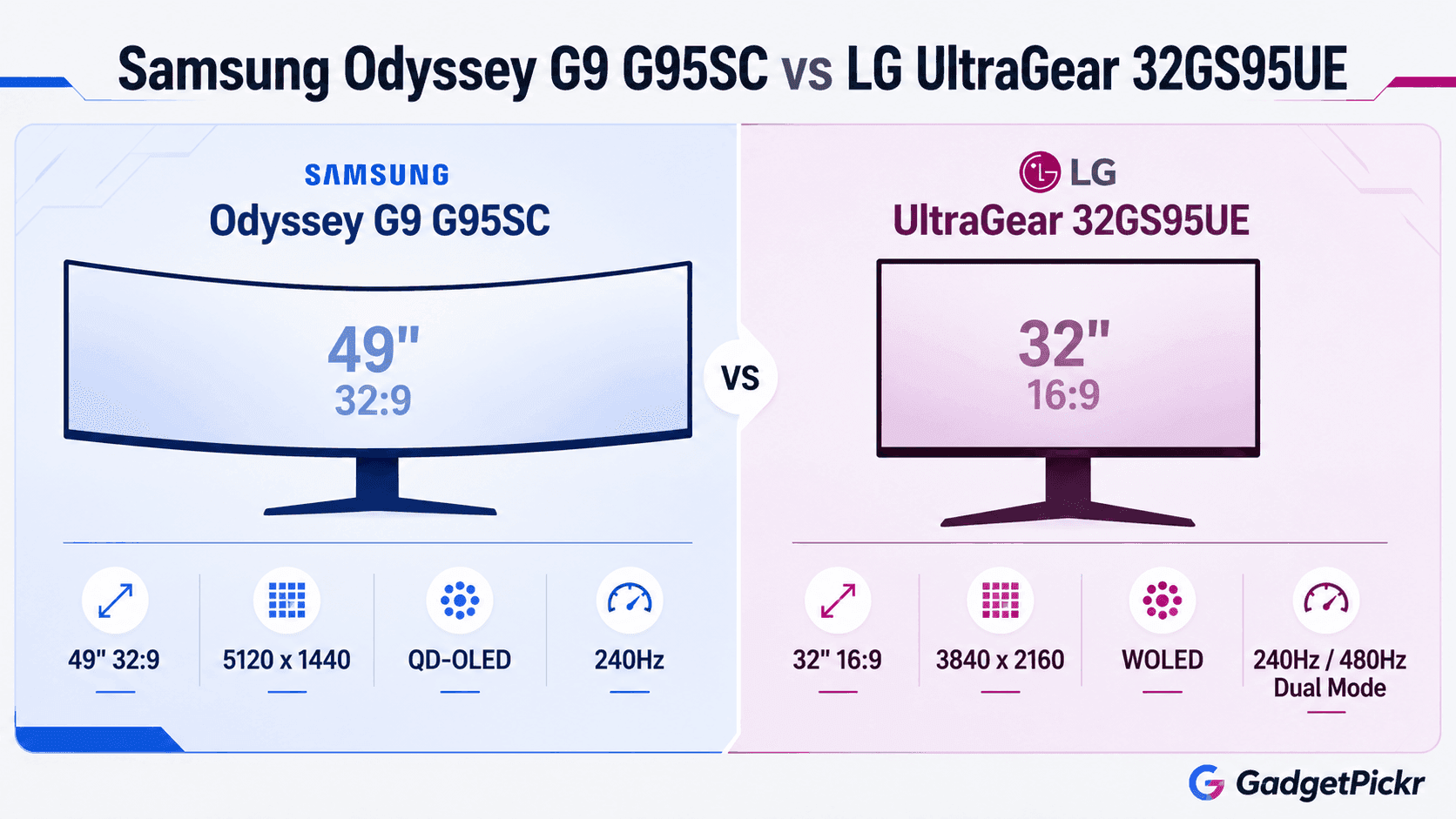
Width, or pixels. Nearly every real difference in Samsung Odyssey G9 G95SC vs LG UltraGear 32GS95UE flows from how you answer that one question. Samsung stretches a curved QD-OLED panel across 49 inches of 32:9 space, handing you a Dual QHD canvas that makes a second monitor pointless. LG goes the opposite direction with a flat 32-inch 16:9 WOLED screen and 4K UHD packed into it, where pixel density does the heavy lifting.<br><br>Panel shape is only the opening argument, though. Samsung layers smart TV software and its Neo Quantum Processor on top of the hardware, so the screen still does something useful with the PC switched off. LG spent that same engineering budget on low-latency desktop gaming and Dual Mode switching instead. Map your game library and your desk depth onto those two philosophies and the answer usually picks itself.
The Quick Take
Sim racers, flight sim pilots, and anyone who lives in three windows at once should take the Odyssey OLED G9 (G95SC) — the 32:9 panel wins that fight outright. Competitive shooter players and console owners want the UltraGear 32GS95UE for its 480Hz mode and native 16:9 4K.
Samsung Odyssey G9 G95SC
A 49-inch curved QD-OLED super-ultrawide with Dual QHD resolution and built-in smart TV apps. Best suited to wide desks and immersion-first play.
Check Price on AmazonLG UltraGear 32GS95UE
A flat 32-inch 4K WOLED panel with Dual Mode refresh switching and full adaptive sync support on both GPU platforms. Built for competitive play and normal desks.
Check Price on AmazonSamsung Odyssey G9 G95SC vs LG UltraGear 32GS95UE: Specs Compared
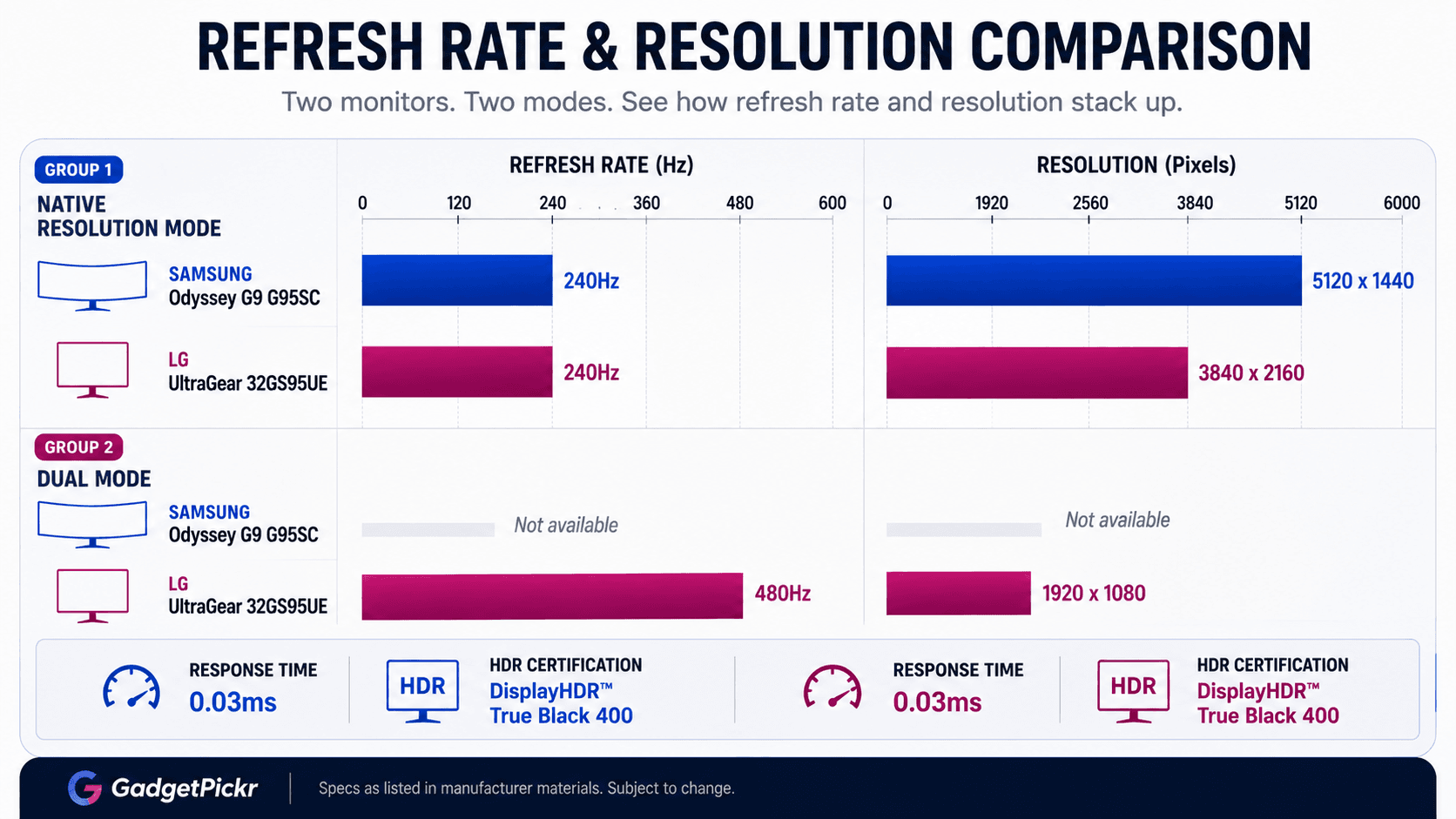
Side by side, the shared numbers matter less than the divergent ones. Both run OLED panels with identical response and HDR certification. Everything about size, shape, pixel count, and refresh behavior pulls them apart.
| Specification | Samsung Odyssey OLED G9 (G95SC) | LG UltraGear 32GS95UE |
|---|---|---|
| Screen Size | 49 Inches | 32 Inches |
| Aspect Ratio | 32:9 | 16:9 |
| Native Resolution | 5120 x 1440 (Dual QHD) | 3840 x 2160 (UHD 4K) |
| Panel Technology | QD-OLED | WOLED |
| Refresh Rate | 240Hz | 240Hz at 4K / 480Hz in 1080p Dual Mode |
| Response Time | 0.03ms | 0.03ms |
| HDR Certification | DisplayHDR True Black 400 | DisplayHDR True Black 400 |
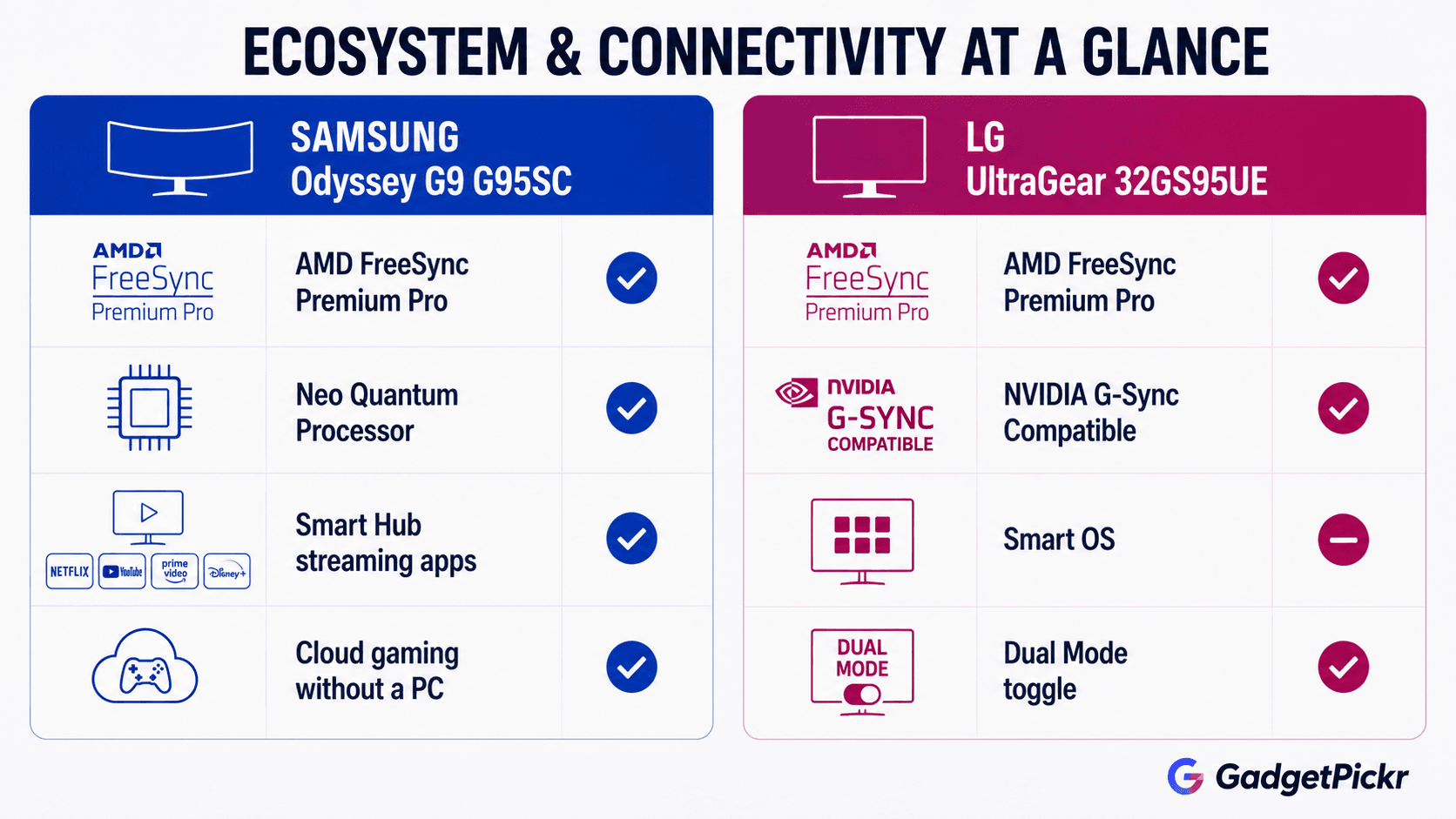
| Adaptive Sync | AMD FreeSync Premium Pro | AMD FreeSync Premium Pro, NVIDIA G-Sync Compatible |
| Smart OS Features | Neo Quantum Processor / Smart Hub | None |
| Best For | Sim racing, flight sims, and two-window multitasking on a wide, deep desk — plus PC-free streaming | Esports shooters and 4K console gaming on a standard-depth desk or monitor arm, with sharp text for daily work |
Specifications as published by Samsung and LG.
Design & Build Quality
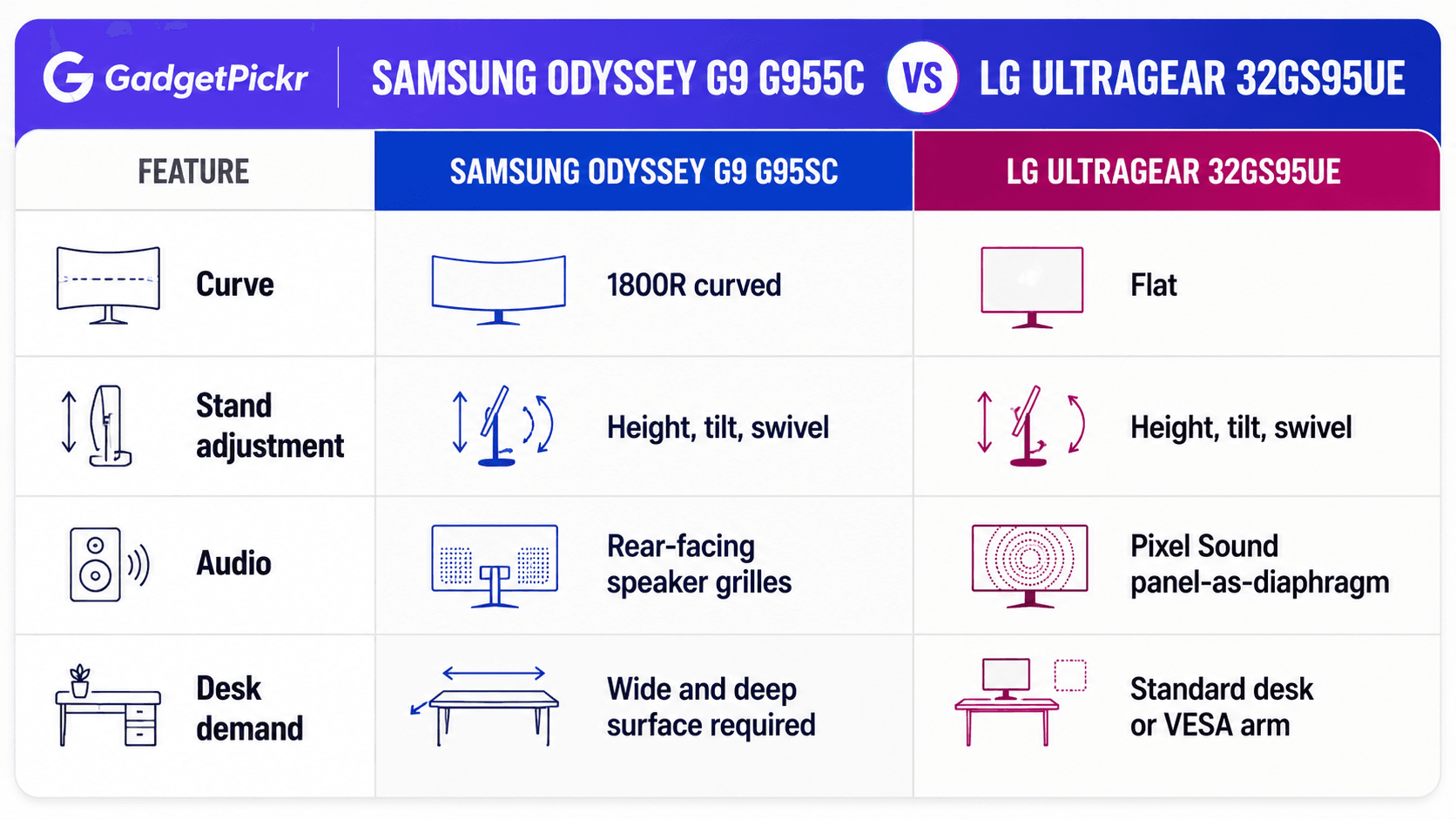
Desk geometry decides this one before you ever power either monitor on. Samsung's 1800R curve across 49 inches needs a wide, deep surface — enough width to clear the side edges and enough depth to keep your keyboard at a sane distance from the panel. You get a metallic rear enclosure, slim side profiles, and a stand with height, tilt, and swivel. The Neo Quantum Processor housing juts out at the back and gives the whole thing an unmistakable silhouette. For something spanning four feet of desk, the edges stay strikingly thin.
LG's approach is far less demanding. A flat 32-inch 16:9 panel drops onto ordinary desks and standard VESA arms without any rearranging, and the adjustable stand covers tilt, height, and swivel. Instead of relying on traditional rear-firing speaker grilles, the 32GS95UE incorporates Pixel Sound technology, turning the OLED panel itself into the primary acoustic diaphragm. No extra bulk under the screen, and audio fires straight at you rather than bouncing off the wall behind. Both chassis feel rigid and well made — the deciding factor is spatial, not structural. One spans the horizon like a merged dual-monitor rig; the other buys you vertical screen height without eating your desk depth.
Performance & Key Features
Look past the shared OLED badge and the panel engineering diverges sharply. Samsung's 49-inch QD-OLED runs 5120 x 1440, and Quantum Dot OLED gives it strong color purity, high color volume, and genuinely black blacks, with an ultra-fast 0.03ms response time and a 240Hz refresh rate. Stretched across 32:9, that resolution buys peripheral vision no 16:9 display can match — cockpit gauges, wing mirrors, distant horizon, all in view at once. The Neo Quantum Processor also scales content and runs Samsung's smart platform, so streaming apps and cloud gaming work with the tower switched off entirely.
LG chases motion and flexibility instead. Its 32-inch 4K WOLED panel delivers razor-sharp text and dense imagery in a shape every game already supports. Dual Mode is the headline feature: run natively at 4K and 240Hz, then flip the panel to 1080p at 480Hz when frame rate matters more than detail. Add the 0.03ms response figure and DisplayHDR True Black 400, and you get one screen that handles ranked shooters and cinematic single-player runs without compromise. Certification for AMD FreeSync Premium Pro plus NVIDIA G-Sync compatibility covers both GPU camps — Samsung lists FreeSync Premium Pro only.
So it's a clean trade. Samsung sells you two 1440p displays fused into one uninterrupted QD-OLED sheet. LG sells you 4K density plus a 480Hz competitive gear that no ultrawide in this class offers.
Pros & Cons: Samsung Odyssey G9 G95SC
Nothing else replaces a dual-monitor setup this convincingly. That strength comes bundled with a form factor that not every desk — or graphics card — can absorb.
Pros: a 49-inch 32:9 panel that kills the center bezel for good. QD-OLED color saturation, deep contrast, and bright highlights. A 240Hz refresh rate paired with the 0.03ms response figure. Built-in smart TV apps and cloud gaming through the Neo Quantum Processor. An 1800R curve that genuinely wraps your field of view in sim racing and flight titles.
Cons: you need serious desk width and depth, plus a GPU that can push 5120 x 1440 without stuttering. Plenty of console and older PC games don't support 32:9 natively, which means black bars. And 1440 vertical pixels look modest next to a 4K panel when you're reading documents rather than flying one.
Pros & Cons: LG UltraGear 32GS95UE
Versatility is the pitch here, and it mostly lands. Dual Mode gives you native 4K at 240Hz or 1080p at 480Hz, backed by that same 0.03ms response spec. The 16:9 shape and 32-inch footprint slot onto conventional desks and stay natively compatible with essentially every PC and console game — no letterboxing, no field-of-view mods. DisplayHDR True Black 400 and dual-platform adaptive sync round out the motion handling.
The trade-off is scope. You don't get the sweeping horizontal canvas a super-ultrawide provides, so anyone hunting a multi-monitor replacement or a proper sim cockpit view will find 32 inches confining. Dropping to 1080p on a 32-inch screen also costs visible sharpness, which purists will notice the moment they leave the killcam.
Real Buyer Scenarios
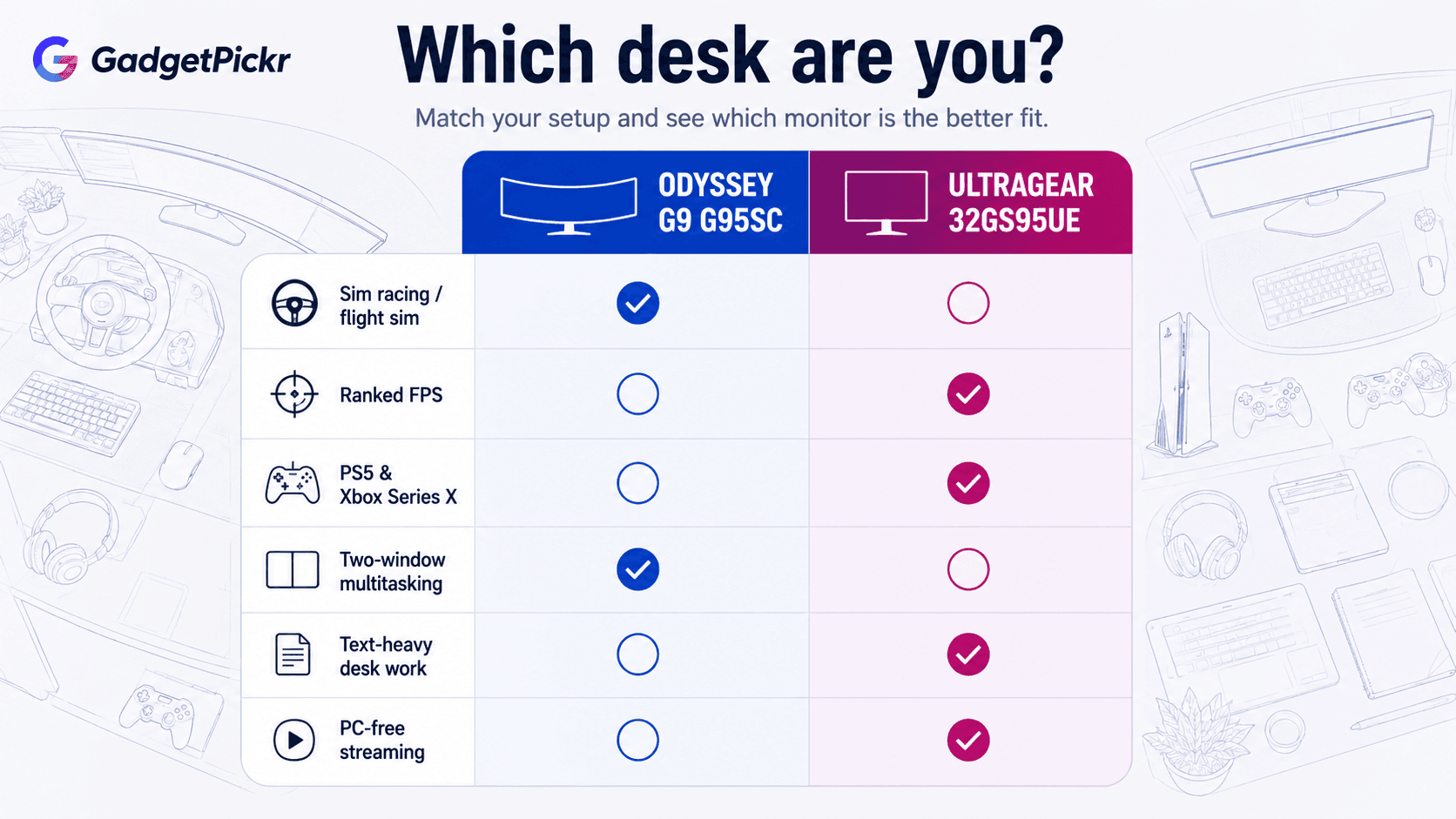
Picture your actual week, not your wish list. Sim racers, flight sim pilots, and people running two 2560x1440 windows side by side all day get more from the G95SC than from any 16:9 panel at this price. Video editors scrubbing long timelines fall in the same camp — the QD-OLED canvas is worth the desk it demands, assuming you have a wide surface and a card that can drive it.
Split your time between ranked shooters and 4K story games instead, and LG takes it. Esports players get real value from flipping into 480Hz mode for the lowest latency and cleanest motion, then switching back to native 3840 x 2160 for open-world RPGs, console sessions, or 4K HDR movies. Universal 16:9 support means nothing gets pillarboxed and nothing needs modding.
Cramped workspace or a monitor arm already mounted? LG installs without drama. Building a single battle station that doubles as a TV? Samsung's onboard smart platform earns its keep every time you watch something without waking the PC.
Alternatives Worth Considering
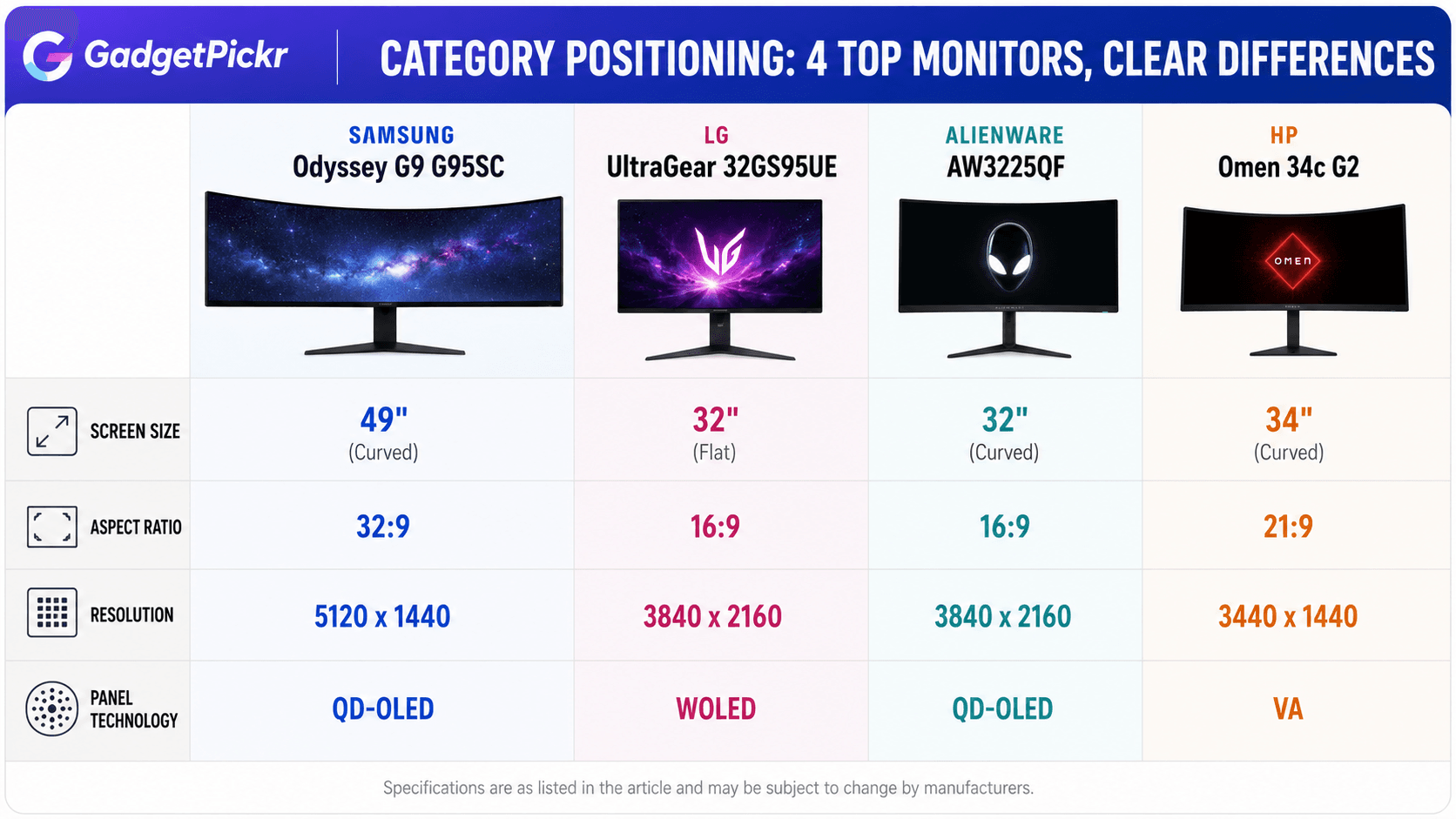
Neither one a perfect fit? Two other directions are worth a look. If the 32-inch 4K OLED shape appeals but you'd rather have a gentle curve than a flat panel, the Alienware AW3225QF is a primary competitor. Featuring a 3840 x 2160 QD-OLED panel with a 240 Hz refresh rate, it delivers rich color saturation, deep blacks, and excellent pixel response times, making it an attractive middle ground for visual fidelity.
Want ultrawide immersion without committing to the 49-inch expanse of the Odyssey G9? Drop to a 34-inch curved model. Options like the HP Omen 34c G2 provide a 3440 x 1440 WQHD resolution at high refresh rates using a VA panel. You trade self-emissive OLED pixels for traditional backlighting, but you still get a wide field of view and room for multiple windows at a far lower entry cost — a sensible landing spot for budget-conscious buyers.
Final Verdict
Here's how Samsung Odyssey G9 G95SC vs LG UltraGear 32GS95UE shakes out by use case. Choose the Odyssey OLED G9 (G95SC) if you race, fly, edit long timelines, or want two full windows with no bezel between them — the 5120x1440 canvas gives peripheral vision a 16:9 display simply cannot reproduce, on QD-OLED color that holds up.<br><br>Choose the LG UltraGear 32GS95UE if you play competitive shooters, own a PS5 or Xbox Series X, or spend your workday in text. Native 16:9 4K matches console output exactly, renders sharper type for daily work, and the 32-inch footprint sits on a normal desk without heavy-duty mounting hardware. Want immersion and side-by-side window layouts? Samsung. If your focus centers on competitive framerates, 4K pixel clarity, and dual HDMI 2.1 console support, LG offers the better balanced package.
Sources & References
Specifications and claims in this analysis were cross-referenced against the sources below.
- 32-Inch UltraGear™ OLED Gaming Monitor - 32GS95UE-B | LG USAlg.com
- LG 32GS95UE Review 2026: 4K 240Hz / 1080p 480Hz Monitordisplayninja.com
- 49" Odyssey OLED G9 G95SC | Samsung Caribbeansamsung.com
- 31.46" LG 32GS95UE - Specifications - DisplaySpecificationsdisplayspecifications.com
- Odyssey OLED G9 49" - Écran PC Gamersamsung.com
- 2023 G95SC 49 inch Odyssey OLED G9 Gaming Monitor | Samsung {Country Name}samsung.com
- LG UltraGear 32GS95UE OLED gaming monitor review - Stuffstuff.tv
- Samsung Odyssey OLED 49" Curved Gaming Monitor | Samsung KSAsamsung.com
Frequently Asked Questions
The LG UltraGear 32GS95UE. Its Dual Mode drops the panel to 1080p and runs at 480Hz, roughly double the Samsung's 240Hz ceiling, with the same 0.03ms response spec and G-Sync compatibility alongside FreeSync Premium Pro.


